Signup form builder
With Pro, Settings → Login and signup has a signup form builder.
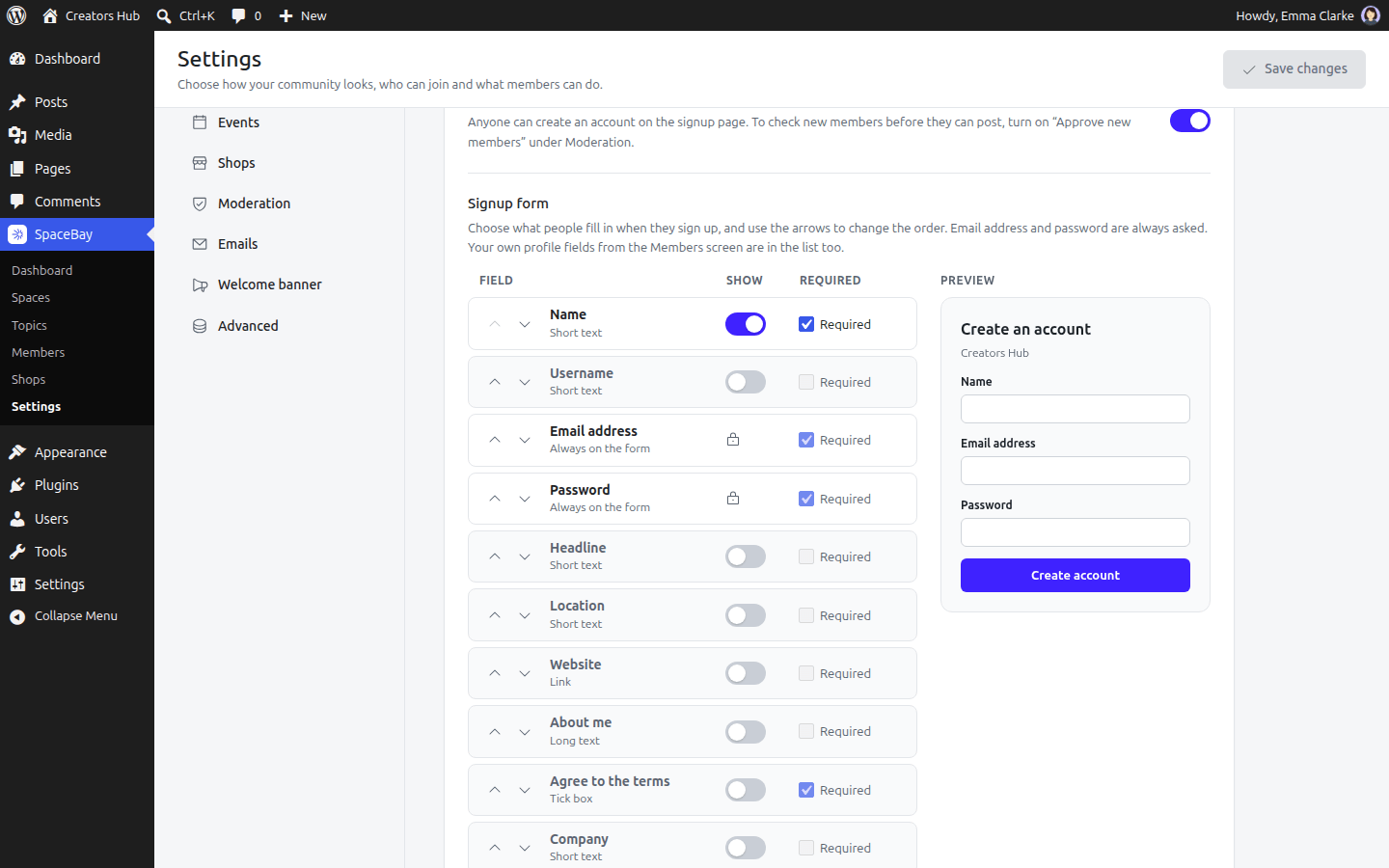
Settings → Login and signup: the signup form builder with its preview.
- Use the Show switch to put a field on the form or take it off.
- Tick Required when people must fill it in. Other fields are marked “(optional)” on the form.
- Use the arrows to change the order. The Preview shows the form as visitors will see it.
- Select Save changes.
- Email address and Password are always on the form.
- You can add Name, Username, Headline, Location, Website, About me and every custom profile field you created. What people enter is saved on their profile.
- Without the Username field, the username is the name plus 4 random characters (for example
jane-doe-k3x9). - Agree to the terms adds the terms tick box. Enter the address of your terms under Terms page to link to them.
Without Pro, the form goes back to the standard fields. The fields you chose are kept for when Pro is active again.
 SpaceBay
 Build a community, activity feed, group chat and events on your own WordPress site.
Get SpaceBay Pro
