
Conditional Visibility
Conditional Visibility lets you show or hide fields based on what the customer has already selected in the same Option Group. Use it to build branching option flows that adapt in real time as the customer interacts.
How It Works
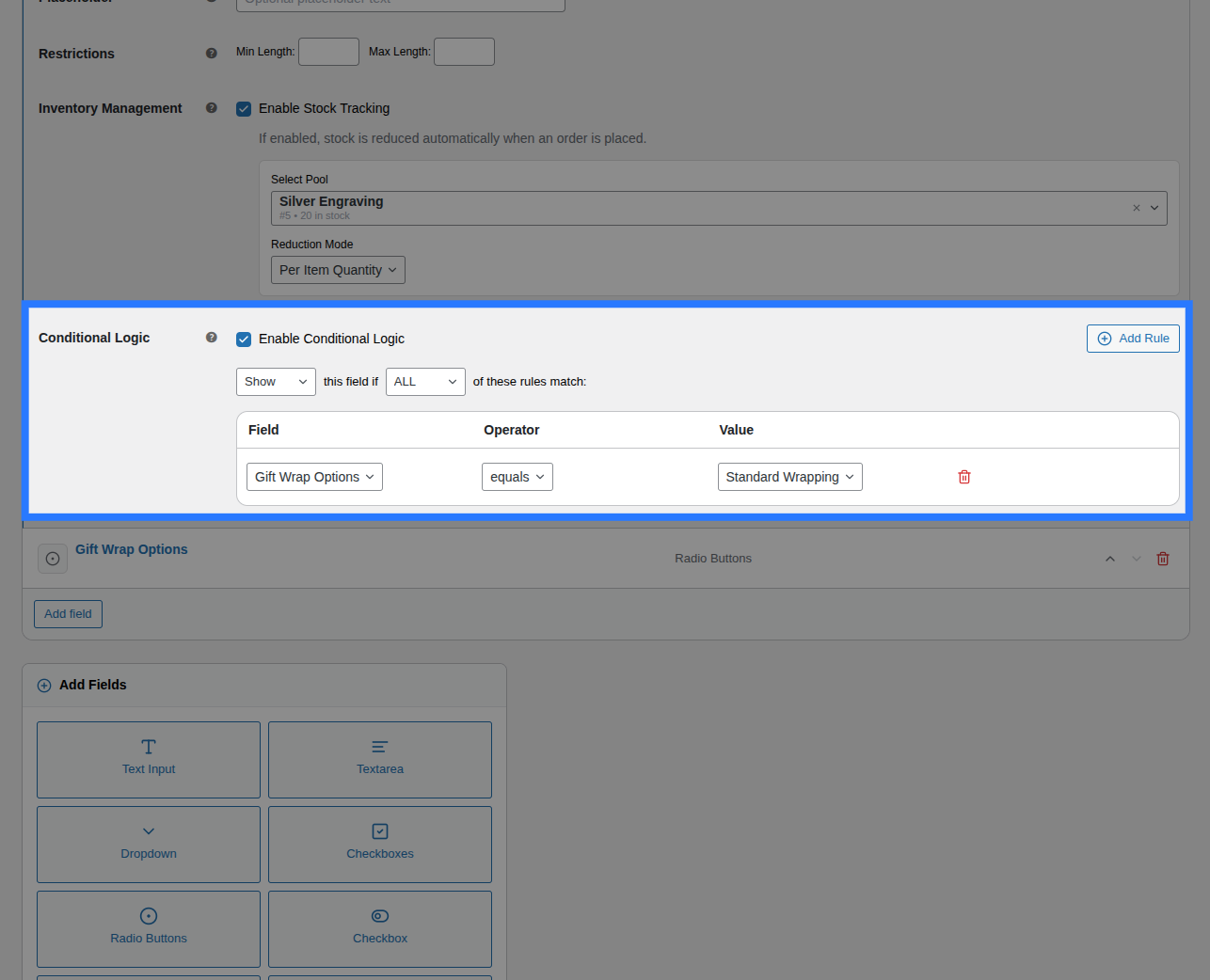
Each field has a Visibility tab in the Addon Builder. You configure a set of rules (conditions) that are evaluated against the other fields in the same group. If the conditions are met, the field is either shown or hidden depending on your action setting.
On the frontend, the JavaScript engine re-evaluates all conditions in real time as the customer interacts. Fields appear and disappear without any page reload.
On the backend (at cart submission), the same conditions are re-evaluated server-side by ConditionEvaluator.php to ensure:
- Hidden fields are not validated as required
- Hidden fields do not contribute to pricing calculations
- Hidden fields are not saved to the cart or order
Setting Up Conditions
Inside the Visibility tab of any field:
Step 1 — Enable Conditions
Toggle Enable Conditional Logic to on.
Step 2 — Choose the Action
| Action | Effect |
|---|---|
| Show this field when… | Field is hidden by default; shown only when conditions are met |
| Hide this field when… | Field is visible by default; hidden when conditions are met |
Step 3 — Set Match Type
| Match Type | Logic |
|---|---|
| ALL (AND) | Every single rule must be true for the action to trigger |
| ANY (OR) | At least one rule must be true for the action to trigger |
Step 4 — Add Rules
Click Add Rule. Each rule has three parts:
| Part | Description |
|---|---|
| Field | Select which other field in the group to watch |
| Operator | The comparison to perform |
| Value | The value to compare against |
Supported Operators
| Operator | Meaning | Works With |
|---|---|---|
== (equals) | Value exactly matches | All fields |
!= (not equals) | Value does not match | All fields |
> (greater than) | Numeric comparison | Number fields |
< (less than) | Numeric comparison | Number fields |
>= (greater than or equal) | Numeric | Number fields |
<= (less than or equal) | Numeric | Number fields |
contains | Value appears in the selection | Checkbox (multi), text |
not contains | Value does not appear in selection | Checkbox (multi), text |
is empty | No value submitted | All fields |
is not empty | A value has been submitted | All fields |
Examples
Show "Engraving Text" only if "Add Engraving?" is checked
Action: Show this field when...
Match: ALL

Rule 1:
  Field:    Add Engraving?
  Operator: == (equals)
  Value:    1
The 1 value is what a single checkbox submits when checked.
Hide shipping note if "In-store pickup" is selected
Action: Hide this field when...
Match: ALL

Rule 1:
  Field:    Delivery Method
  Operator: == (equals)
  Value:    pickup
Show "Rush fee" warning only if quantity is 10 or more
Action: Show this field when...
Match: ALL

Rule 1:
  Field:    Quantity Needed
  Operator: >= (greater than or equal)
  Value:    10
Show discount field if EITHER coupon code OR loyalty badge is selected
Action: Show this field when...
Match: ANY

Rule 1:
  Field:    Promo Code
  Operator: is not empty

Rule 2:
  Field:    Loyalty Tier
  Operator: contains
  Value:    gold
Initial Render (No Layout Shift)
When the product page loads, Smart Product Options and Addons sets the initial visibility of each conditional field server-side before the page renders. Fields set to "show when…" start hidden (CSS class ob-hidden). This prevents the flash of an incorrect state while JavaScript initialises.
Conditions and Validation
Fields that are hidden by conditions are fully skipped during:
- Required field validation at add-to-cart
- Pricing calculations
- Cart session storage
- Order item metadata
A hidden field never appears on the cart page, checkout, or order — even if it has a required setting or a price attached.
Cross-Group Conditions Not Supported
Conditions can only reference other fields within the same Option Group. You cannot create conditions that watch fields in a different group.