
Field Conditions Reference
Conditions let each field decide when it should be visible — based on what the customer has already entered or selected in the same Option Group. This page is a focused reference for how conditions work at the field level.
For a full walkthrough with examples, see Conditional Visibility.
The Conditions Tab
Every field in the Addon Builder has a Conditions tab (also labelled "Visibility" in the UI). Open it by expanding any field and clicking the Conditions tab.
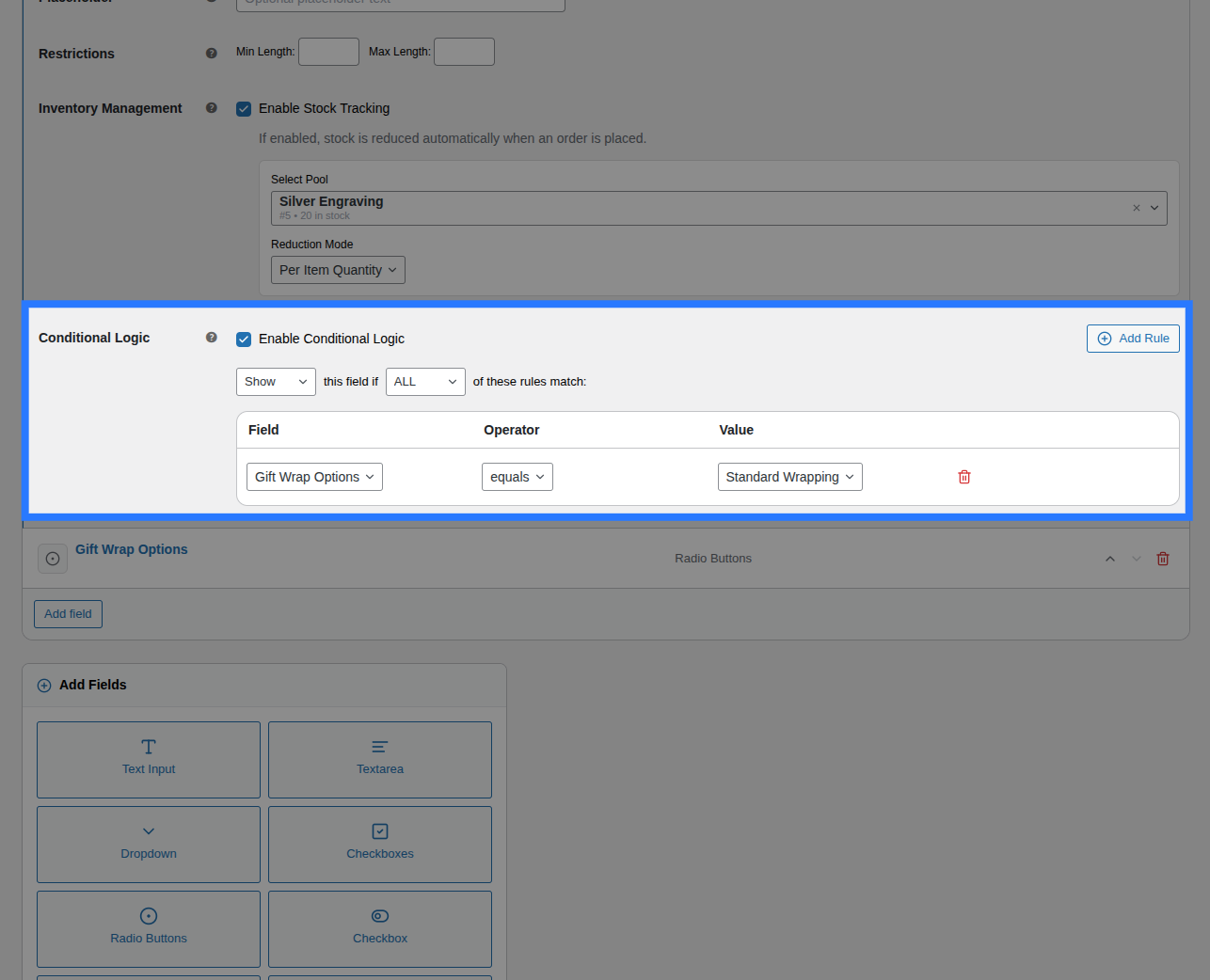
How to Set Up Conditions
Step 1 — Enable Conditions
Toggle Enable Conditional Logic to on. The rule builder appears.
Step 2 — Choose an Action
| Action | Meaning |
|---|---|
| Show this field when… | Field is hidden by default — appears only when all/any conditions are met |
| Hide this field when… | Field is visible by default — disappears when all/any conditions are met |
Step 3 — Match Type
| Match Type | Logic |
|---|---|
| ALL | Every rule must pass (AND logic) |
| ANY | At least one rule must pass (OR logic) |
Step 4 — Add Rules
Each rule watches another field in the same group:
| Part | Description |
|---|---|
| Field | The field to watch (target field) |
| Operator | How to compare the value |
| Value | What value to compare against |
Operators
String & Choice Operators
| Operator | Works For |
|---|---|
== (equals) | Exact match — select, radio, single checkbox (1), text |
!= (not equals) | Does not match |
contains | Value is included in a multi-checkbox selection |
not contains | Value is not in a multi-checkbox selection |
is empty | No value has been entered or selected |
is not empty | A value exists |
Numeric Operators
| Operator | Works For |
|---|---|
> (greater than) | Number inputs |
< (less than) | Number inputs |
>= (greater than or equal) | Number inputs |
<= (less than or equal) | Number inputs |
Field Values to Use in Conditions
Different field types submit different values — use these to write accurate condition rules:
| Field Type | Value to compare |
|---|---|
| Select | The option's value property (e.g. large) |
| Radio | The option's value property |
| Single Checkbox | 1 when checked, empty string when unchecked |
| Multi-Checkbox | Use contains / not contains with any single option value |
| Text / Textarea / Email | The exact text typed, or is empty / is not empty |
| Number | A numeric string — use numeric operators (>, <, ==) |
| Color Swatch | The swatch's value property |
| Image Swatch | The swatch's value property |
What Happens to Hidden Fields
When a field is hidden by its conditions:
| Area | Behaviour |
|---|---|
| Frontend | Field fades out or is absent from the DOM with class ob-hidden |
| Validation | Skipped — a hidden required field will NOT block add-to-cart |
| Pricing | Excluded — a hidden priced field adds $0.00 |
| Cart / Order | Not saved — hidden fields produce no order item metadata |
| Stock | Not deducted — hidden stock-linked fields do not reduce inventory |
This is enforced server-side by ConditionEvaluator.php, so it cannot be bypassed by disabling JavaScript.
Initial Render (No Flicker)
When the product page first loads, Smart Product Options and Addons calculates the initial visibility of every conditional field on the server before sending HTML to the browser. Fields that start hidden receive the CSS class ob-hidden inline, preventing a visible flash before JavaScript initialises.
Limitations
- Conditions can only watch fields within the same Option Group — cross-group conditions are not supported
- A field cannot create a condition that watches itself
- Circular conditions (Field A depends on B, B depends on A) are not validated in the builder — set these up carefully
Quick Examples
Show a text field only if a checkbox is ticked
| Part | Value |
|---|---|
| Action | Show this field when… |
| Match | ALL |
| Field | Add engraving? |
| Operator | == (equals) |
| Value | 1 |
Hide a note field if "In-store pickup" is selected
| Part | Value |
|---|---|
| Action | Hide this field when… |
| Match | ALL |
| Field | Delivery Method |
| Operator | == (equals) |
| Value | pickup |
Show an upsell only if the order is 5 or more units
| Part | Value |
|---|---|
| Action | Show this field when… |
| Match | ALL |
| Field | Quantity Needed |
| Operator | >= (greater than or equal) |
| Value | 5 |
Show a discount field if EITHER promo OR loyalty tier is set
| Part | Value |
|---|---|
| Action | Show this field when… |
| Match | ANY |
| Rule 1 Field | Promo Code |
| Rule 1 Operator | is not empty |
| Rule 2 Field | Loyalty Tier |
| Rule 2 Operator | contains |
| Rule 2 Value | gold |