
Offer Types & Goals
Placement-Based Offer Types
Section titled “Placement-Based Offer Types”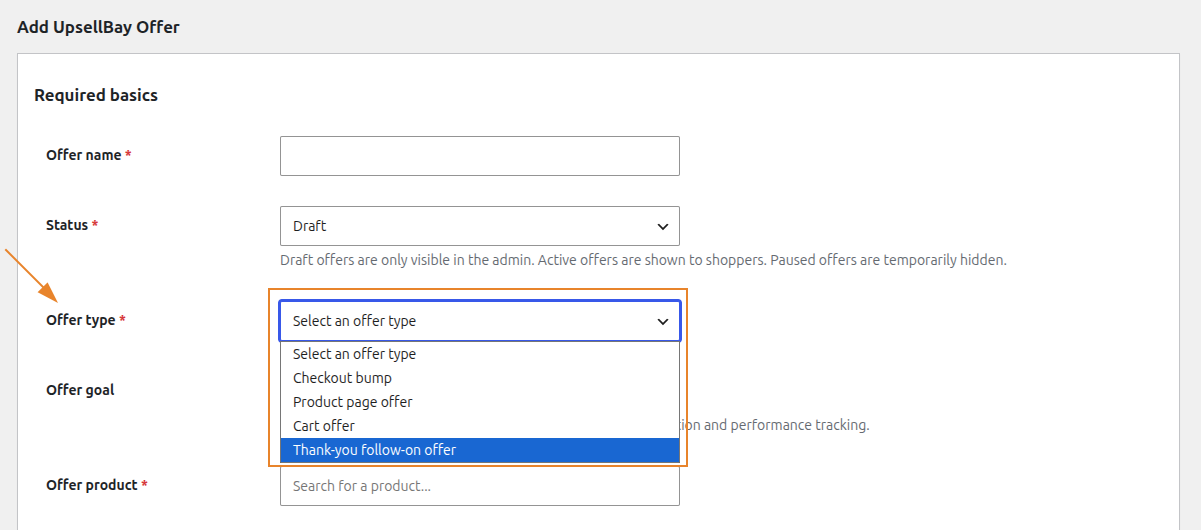
Product Page Offer
Section titled “Product Page Offer”Displayed immediately after the add-to-cart form on the product page. This placement is ideal for companion recommendations, required accessories, and “frequently bought together” style cross-sells. Learn more about Product Page Offers
Cart Offer
Section titled “Cart Offer”Displayed within the cart review area. This placement is highly effective for threshold-helper offers (e.g., “Add $5 to get free shipping”) or direct cross-sells while the shopper is evaluating their intended purchases. Learn more about Cart Offers
Checkout Bump
Section titled “Checkout Bump”Presented seamlessly within the checkout flow, typically right before the final order submission. Best utilized for low-friction, impulse-buy accessories, expedited shipping options, or extended warranties. Learn more about Checkout Bumps
Thank-You Follow-On Offer
Section titled “Thank-You Follow-On Offer”Shown exclusively on the “Order Received” page after the primary checkout is complete. Perfect for capturing post-purchase momentum with exclusive, second-purchase follow-ons without risking the initial sale. Learn more about Thank-You Offers
Goal Classifications
Section titled “Goal Classifications”Beyond their placement, every offer is assigned a Goal classification. While goals do not alter the physical placement of the offer, they are critical for internal organization, smart conflict prevention, and precise reporting interpretation:
- Add-on: A complementary item that enhances the main purchase (e.g., batteries, protective case).
- Upgrade: A superior or more expensive version of the item the customer is currently considering.
- Protection: Warranties, shipping insurance, or extended support plans.
- Threshold Helper: Items strategically priced to help a customer cross a promotional boundary (like free shipping or a bulk discount).
- Follow-on: A distinct, secondary purchase proposition made after the initial transaction has been secured.