
Cart Offer
What is a Cart Offer?
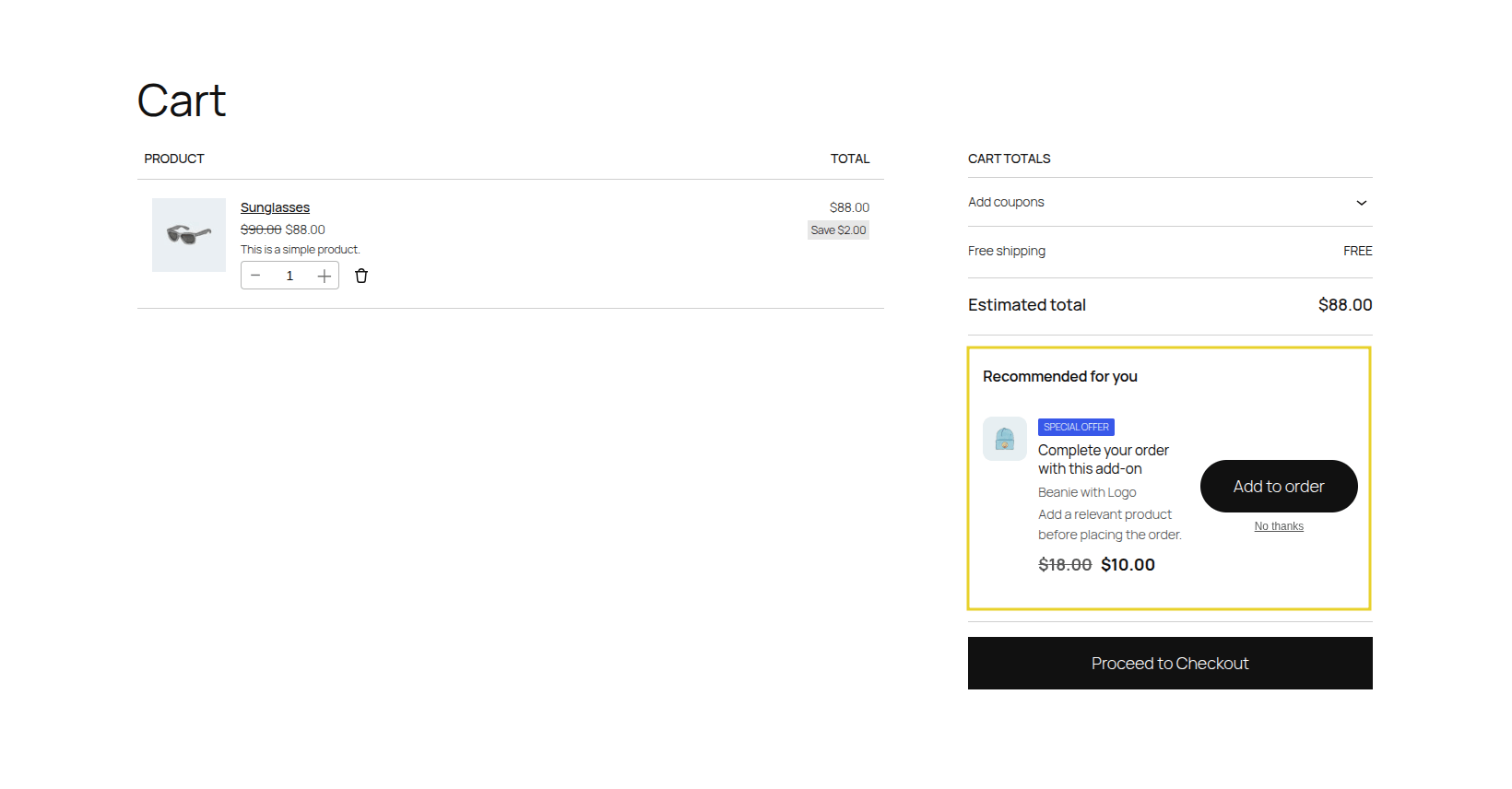
Section titled “What is a Cart Offer?”A Cart Offer is displayed on the main shopping cart page, typically just below the cart items table or near the cart totals. At this stage, the customer is reviewing their intended purchases before proceeding to checkout.
This is the perfect place to present cross-sells or to encourage the customer to spend a little more to reach a specific goal, like free shipping.
How it Works
Section titled “How it Works”- Dynamic Recalculation: As a customer adds, removes, or changes item quantities on the cart page, UpsellBay instantly evaluates the new cart state against your active offer rules.
- Threshold Logic: If an offer is configured to trigger based on a cart subtotal (e.g., “Spend $50, get 10% off Product X”), the offer dynamically appears or disappears as the cart total fluctuates.
- Seamless AJAX Updates: Accepting the offer adds the item via an asynchronous AJAX request. This instantly updates the cart totals without forcing a full page reload, maintaining the customer’s momentum and focus.
How to Create a Cart Offer
Section titled “How to Create a Cart Offer”Follow these steps to create your first Cart Offer:
1. Core Configuration
Section titled “1. Core Configuration”Go to WooCommerce > UpsellBay > Offers and click Add Offer.
- Offer name: An internal name to identify the offer in your admin.
- Offer type: Select Cart cross-sell.
- Status: Set to Active (or Draft if you want to test it first).
- Offer goal: Select the intent of your offer (e.g., Cross-sell or Threshold Offer).
- Offer product: Search and select the exact product you want to recommend to shoppers.
2. Triggers and Rules
Section titled “2. Triggers and Rules”UpsellBay needs to know when to show this offer. You can set this up using basic triggers or advanced rules.
- Trigger product IDs: Enter comma-separated product IDs. The offer will show if any of these products are in the cart.
- Trigger category IDs: Enter comma-separated category IDs. The offer will show if a product from these categories is in the cart.
For more complex logic, leave triggers empty and use Rules:
- Rule matching: Choose whether the customer must meet All rules or Any rule.
- Rules Builder: Create conditions like cart subtotals, specific user roles, or stock statuses.
3. Display and Content
Section titled “3. Display and Content”Customize how the offer looks and feels to the shopper:
- Headline: The main title of your offer.
- Body text: Optional short description (max 240 characters) shown below the headline.
- Button text: The call-to-action on the button.
- Show product image: Check to display the offered product’s thumbnail image.
- Hide if in cart: Check this to automatically hide the offer if the customer has already added the offered product to their cart.
4. Pricing and Discounts
Section titled “4. Pricing and Discounts”Incentivize the customer to take action:
- Discount type: Choose between No discount, Percentage, Fixed amount off, or Fixed offer price.
- Discount value: Enter the numeric value. The live preview will automatically show you the updated price based on your selection.
5. Finalizing
Section titled “5. Finalizing”- Priority: If multiple offers are eligible, the one with the lower priority number wins.
- Start / End date: Optionally schedule your offer to run during a specific timeframe.
Click Save offer. If your status is Active, the cart offer will immediately start showing on the cart page!
The Sales Psychology
Section titled “The Sales Psychology”Cart Offers utilize two proven psychological drivers:
- Goal Gradient Effect: Humans are highly motivated to complete a goal when they are close to it. If they are $5 away from free shipping, a $10 cart offer feels like a smart financial decision rather than an extra expense.
- Logical Pairing: The customer is currently reviewing their intended purchases. Offering a logical pairing at this exact moment (“I bought the shoes, but I need the socks”) feels helpful and additive, not pushy.
What Can Go Wrong
Section titled “What Can Go Wrong”- Distraction from Checkout: The primary goal of the cart page is to get the customer to click “Proceed to Checkout.” If your cart offer is too large, too loud, or confusing, it can cause the customer to pause, rethink, or abandon their cart.
- Irrelevant Upsells: Offering a completely unrelated product here breaks the customer’s shopping momentum. The offer must make logical sense based on what is already in their cart.
- Hidden Totals: If adding the offer causes the total price to jump unexpectedly without clearly displaying the discount, it can erode trust.
How This Helps Your Business
Section titled “How This Helps Your Business”Cart offers are exceptional at driving incremental revenue through volume. By strategically pricing cart offers to bump orders just over your free shipping or discount thresholds, you increase AOV while simultaneously making the customer feel like they won a deal.