
Thank-You Follow-on Offer
What is a Thank-You Offer?
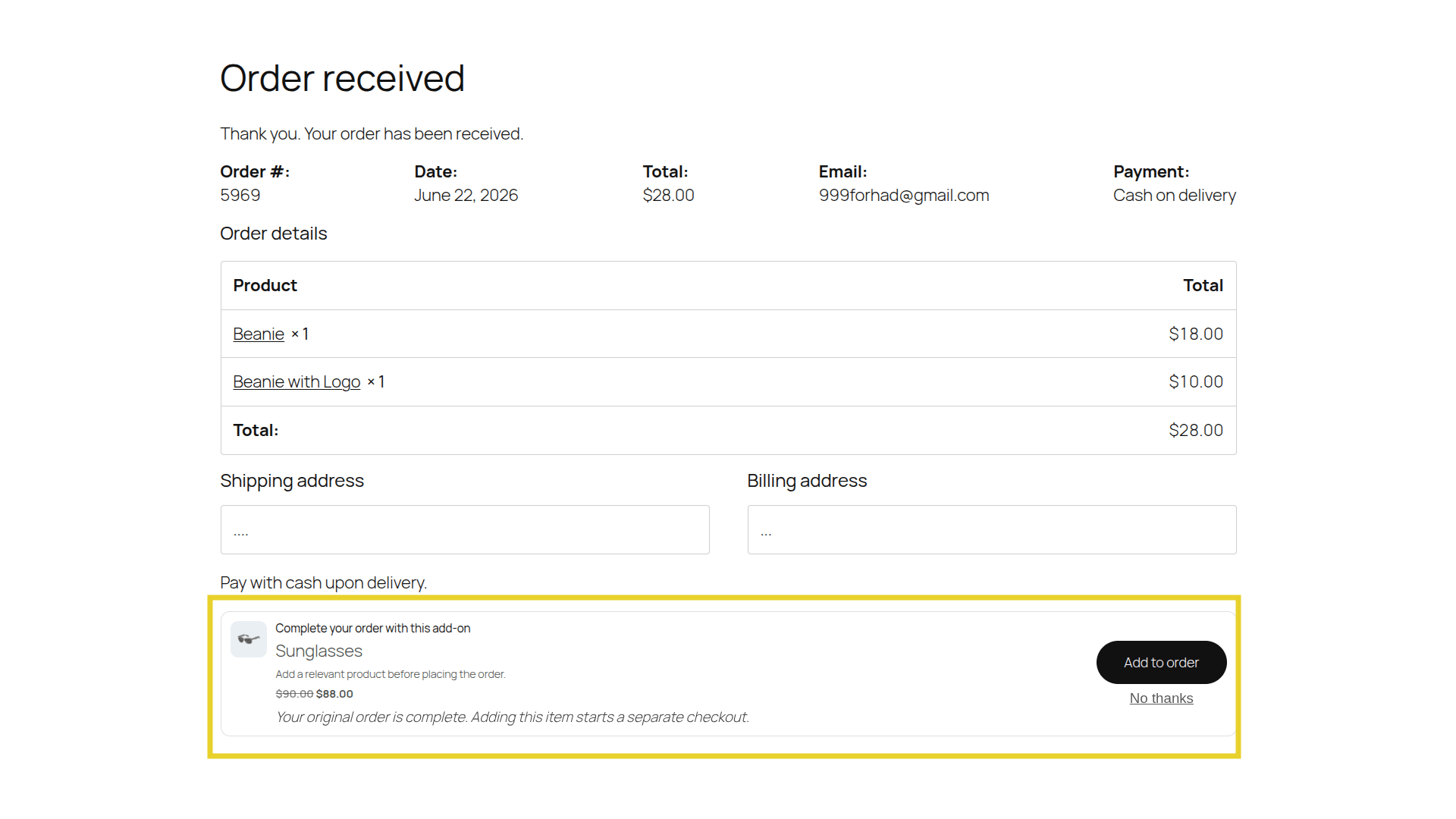
Section titled “What is a Thank-You Offer?”A Thank-You Follow-on Offer is presented on the WooCommerce “Order Received” (Thank You) page, immediately after a customer completes their primary purchase.
Unlike pre-purchase offers, the customer has already crossed the finish line. This is a risk-free environment to offer a highly lucrative deal without any fear of causing cart abandonment.
How it Works
Section titled “How it Works”- Post-Purchase Evaluation: Once the primary order is successfully placed, UpsellBay instantly evaluates your active Thank-You offers against the contents of the newly completed order (e.g., checking if the customer just bought a coffee machine).
- Safe Environment: The offer is rendered exclusively on the final Thank-You page. Because the primary transaction is already securely processed and finalized, there is absolutely zero risk to your initial order revenue.
- Follow-On Checkout: If the customer accepts the offer, UpsellBay adds the item to a new cart and starts a separate checkout for it. The completed order is never changed or charged again.
How to Create a Thank-You Offer
Section titled “How to Create a Thank-You Offer”Follow these steps to create your first Thank-You Offer:
1. Core Configuration
Section titled “1. Core Configuration”Go to WooCommerce > UpsellBay > Offers and click Add Offer.
- Offer name: An internal name to identify the offer in your admin.
- Offer type: Select Thank-you offer.
- Status: Set to Active (or Draft if you want to test it first).
- Offer goal: Select the intent of your offer (e.g., Add-on or Exclusive Deal).
- Offer product: Search and select the exact product you want to recommend to shoppers.
2. Triggers and Rules
Section titled “2. Triggers and Rules”UpsellBay needs to know when to show this offer. You can set this up using basic triggers or advanced rules based on the order that was just placed.
- Trigger product IDs: Enter comma-separated product IDs.
- Trigger category IDs: Enter comma-separated category IDs.
For more complex logic, leave triggers empty and use Rules:
- Rule matching: Choose whether the customer must meet All rules or Any rule.
- Rules Builder: Create conditions like order totals, specific user roles, or customer order counts.
3. Display and Content
Section titled “3. Display and Content”Customize how the offer looks and feels to the shopper:
- Headline: The main title of your offer (e.g., “Wait! Add this to your order…”).
- Body text: Optional short description (max 240 characters) shown below the headline.
- Button text: The call-to-action on the button (e.g., “Add for $10”).
- Show product image: Check to display the offered product’s thumbnail image.
- Hide if in cart: N/A for Thank-You offers, as the cart is already empty at this stage.
4. Pricing and Discounts
Section titled “4. Pricing and Discounts”Incentivize the customer to take action:
- Discount type: Choose between No discount, Percentage, Fixed amount off, or Fixed offer price.
- Discount value: Enter the numeric value. The live preview will automatically show you the updated price based on your selection.
5. Finalizing
Section titled “5. Finalizing”- Priority: If multiple offers are eligible, the one with the lower priority number wins.
- Start / End date: Optionally schedule your offer to run during a specific timeframe.
Click Save offer. If your status is Active, the offer will immediately start showing on the Thank-You page for eligible orders!
The Sales Psychology
Section titled “The Sales Psychology”Thank-You offers are incredibly powerful because they leverage Post-Purchase Euphoria and Commitment & Consistency:
- Endorphin Rush: The moment right after a purchase is when a buyer feels the highest level of excitement. They are still actively in a “buying mood.”
- Fear of Missing Out (FOMO): Presenting this offer as a strict, one-time-only deal (e.g., “Because you just bought X, you can add Y for 40% off right now only”) creates compelling urgency that is difficult to ignore.
- Zero Friction: Even though it requires a brief follow-on checkout step, the customer’s intent and trust levels are so high that the psychological friction is remarkably low.
What Can Go Wrong
Section titled “What Can Go Wrong”- Buyer’s Remorse: Pushing an extremely expensive follow-on offer immediately after a large purchase can trigger anxiety and lead the customer to cancel or refund the entire order. Keep it proportional.
- Confusing Flow: If it isn’t completely clear that this is an additional purchase, the customer might think they are paying twice for their original order. The copy must explicitly state the terms.
- Overpromising: If the follow-on item delays the shipping of the original purchase, and you don’t communicate this clearly, you will create a poor customer experience.
How This Helps Your Business
Section titled “How This Helps Your Business”Thank-You offers are the holy grail of upselling. They allow you to safely test aggressive offers (like deep discounts on clearance items or subscription upsells) without jeopardizing your core conversion rate. Every dollar generated here is pure, incremental revenue that drastically increases the lifetime value (LTV) of the customer on day one.