

Introduction to NotifyBay
Welcome to the NotifyBay user guide.
NotifyBay is a high-performance, conversion-focused WooCommerce suite designed to recover lost revenue. It empowers store owners to bridge the gap between customer intent and successful conversion by automating Back-in-Stock (Waitlist) and Price Drop (Wishlist) notifications.
Every eCommerce store faces two major conversion killers: Inventory stockouts and price sensitivity. Instead of letting those potential buyers abandon your site, NotifyBay engages them exactly when their interest is highest.
Powerful Sales Recovery Modules
Section titled “Powerful Sales Recovery Modules”NotifyBay provides two distinct modules to capture customer demand and automate your marketing.
⏳ Back-in-Stock (Waitlist)
Section titled “⏳ Back-in-Stock (Waitlist)”When a product hits zero inventory, NotifyBay replaces the static “Out of Stock” message with an elegant, high-converting “Notify Me” form.
- The Trigger: As soon as you update stock in WooCommerce, NotifyBay immediately emails everyone waiting.
- Variation Aware: Customers can subscribe to specific sizes or colors, ensuring they only get notified for the exact item they want.
- Lead Expiry: Allow customers to choose how long they want to stay on the list (e.g., 7, 30, or 90 days), ensuring your notification list stays fresh and relevant.

⭐ Price Drop (Wishlist)
Section titled “⭐ Price Drop (Wishlist)”Allow customers to track their favorite products and wait for a deal. Users can set a “Target Price”—their ideal purchase price.
- The Trigger: If you lower the product price (via a sale or permanent change) to meet or beat their target, they receive an automated alert to come back and buy.
- Strategic Discounting: Analyze subscriber data to see exactly what price point will trigger the most sales.

The Intelligence Engine
Section titled “The Intelligence Engine”NotifyBay isn’t just a mailer; it’s a smart background engine built for modern, high-volume stores.
1. Smart Restocking (Thresholds)
Section titled “1. Smart Restocking (Thresholds)”Avoid “trigger-happy” notifications. If you only restock 1 unit (perhaps a return), NotifyBay can be configured to wait until a larger shipment arrives before firing off thousands of emails. This prevents customer frustration and “sold-out again” disappointment.
2. Fair-Play Restock Batches
Section titled “2. Fair-Play Restock Batches”If you restock 10 items but have 100 people waiting, NotifyBay can notify exactly the first 10 people in line. It then “reserves” those units for a few hours before notifying the next batch, ensuring every customer who gets an email actually has a chance to buy.

3. “Hurry” (Last Chance) Automation
Section titled “3. “Hurry” (Last Chance) Automation”NotifyBay can automatically send a second “Hurry” email when a recently restocked item is about to sell out again. This follow-up triggers immediate conversions by creating a genuine “last chance” scenario.
Exceptional Customer Experience
Section titled “Exceptional Customer Experience”Building trust is just as important as building a list. NotifyBay provides your customers with the transparency they expect from a premium store.
Customer Self-Service Dashboard
Section titled “Customer Self-Service Dashboard”Logged-in users can manage, track, and cancel their alerts directly from their native WooCommerce My Account page. This reduces support tickets and gives customers complete control over their data.
GDPR & Compliance Ready
Section titled “GDPR & Compliance Ready”Includes full support for Double Opt-In verification and one-click unsubscription to ensure your email marketing stays compliant and your sender reputation stays clean.
Data-Driven ROI
Section titled “Data-Driven ROI”Stop guessing what to order or when to run a sale. The NotifyBay dashboard provides clear, actionable metrics:
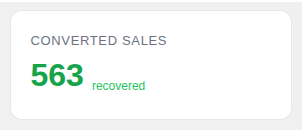
- Converted Sales: See exactly how much money was generated from your notification emails.
- Potential Recovery: Know the total market value of your waitlists to prioritize your purchasing budget.
Ready to Start Recovering Revenue?
Section titled “Ready to Start Recovering Revenue?”NotifyBay is a premium solution available exclusively via our official website.
Next Steps:
Section titled “Next Steps:”- Installation Guide: Learn how to upload and activate your copy.
- Quick Start Guide: Get your first “Notify Me” button live in under 5 minutes.
- Manual Placement: Learn how to use Gutenberg Blocks and Shortcodes.