
Custom Field Column PRO Since v1.2.0
The Custom Field column is one of the most powerful features in ProductBay Pro. It allows you to expose virtually any piece of data associated with your products — including core WooCommerce meta, custom fields added by themes, or data from third-party plugins like Advanced Custom Fields (ACF).
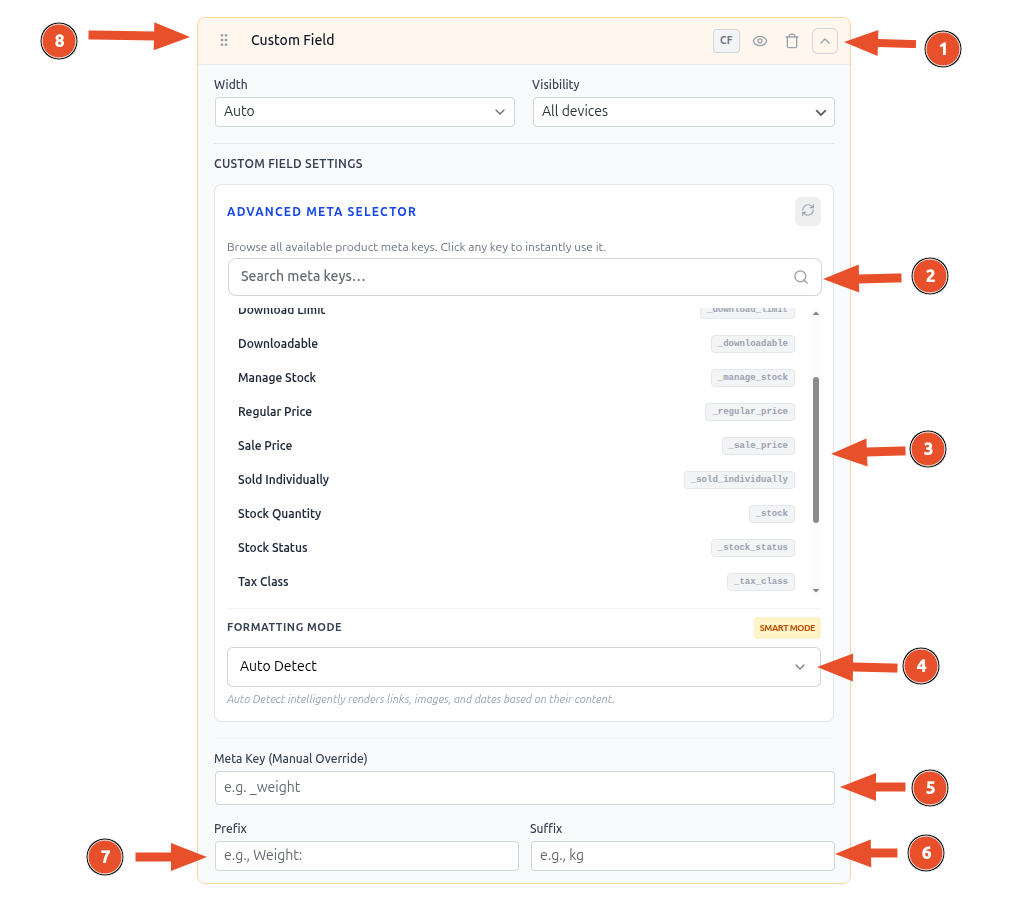
- Click on chevron icon to expand the custom field column settings.
- You can browse and search all available meta keys here.
- You can select any avaiable keys just by click on it.
- You can select the formatting mode.
- Meta Key (Manual Override), this is the actual field that fetchs data in the custome field. You put your meta key here.
- You can add suffix which will be added at the end of the content in each row for that custom field.
- You can add prefix which will be added at the beginning of the content in each row for that custom field.
- Like any other column, you can drag to change order, hide column name in the table header, or remove the custom field column.
Adding the Column
While creating or editing a table, click on Manage Columns button and select Custom Field option.
Meta-Key Discovery Panel
Instead of forcing you to remember and manually type raw database meta keys (like _regular_price or _stock), ProductBay Pro features an intelligent discovery panel.
When you click to select a meta key, the panel will automatically scan your product database and present available keys grouped into logical categories:
- WooCommerce Fields: Native WooCommerce data (Weight, Length, Width, Height, Total Sales, etc.).
- ACF Fields: If Advanced Custom Fields is active, keys will be labeled with their friendly names and grouped by Field Group.
- Custom Post Meta: Any other custom fields discovered in the
wp_postmetatable.
Display Formats
Because custom fields can contain anything from a simple text string to an image ID or a Unix timestamp, ProductBay allows you to choose exactly how the data should be rendered.
Choose from 7 distinct formats:
Auto (Smart Detection)
The default setting. ProductBay attempts to aggressively deduce the data type. For example:
- If the value is a known Attachment ID, it renders an image thumbnail.
- If it looks like a URL, it renders a clickable link.
- If it's a known date format, it formats it according to your site's timezone.
Text
The safest option. The data is escaped and rendered as plain text. Arrays or complex objects are flattened to a comma-separated string.
Image
Tells ProductBay that the field contains an Image/Attachment ID (e.g., from an ACF Image field returning an ID) or a direct Image URL. It will render an <img> tag in the table cell.
Link
Forces the value to be wrapped in a clickable anchor tag (<a>).
Date
Interprets the data (whether a Unix timestamp like 1712743821 or a string like 20240410) as a date and formats it using your WordPress Settings → General date format.
Number
Formats the custom field value according to your site's locale (e.g., adding thousands separators).
Boolean
If the custom field stores a true/false value (e.g., 1/0, true/false, yes/no, on/off), this format will render a stylized "Yes" or "No" badge.
Prefix and Suffix
You can inject static text immediately before or after the custom field value.
- Prefix Example: If your field returns
14, setting a prefix ofAislewill renderAisle 14. - Suffix Example: If your field returns
220, setting a suffix ofVwill render220 V.
Fallback Value
Not all products will have data for a specific custom field. By default, ProductBay will display an em-dash (—) for empty cells. You can change this behavior by entering a custom Fallback Value.
Third-Party Plugin Support
ProductBay's custom field discovery is fully compatible with, and can automatically detect fields registered by:
- Advanced Custom Fields (ACF) & ACF Pro
- Meta Box
- Pods
- JetEngine
(Note: For complex fields like repeating groups or galleries, ProductBay will attempt to render a summarized, flattened string).