
Offers
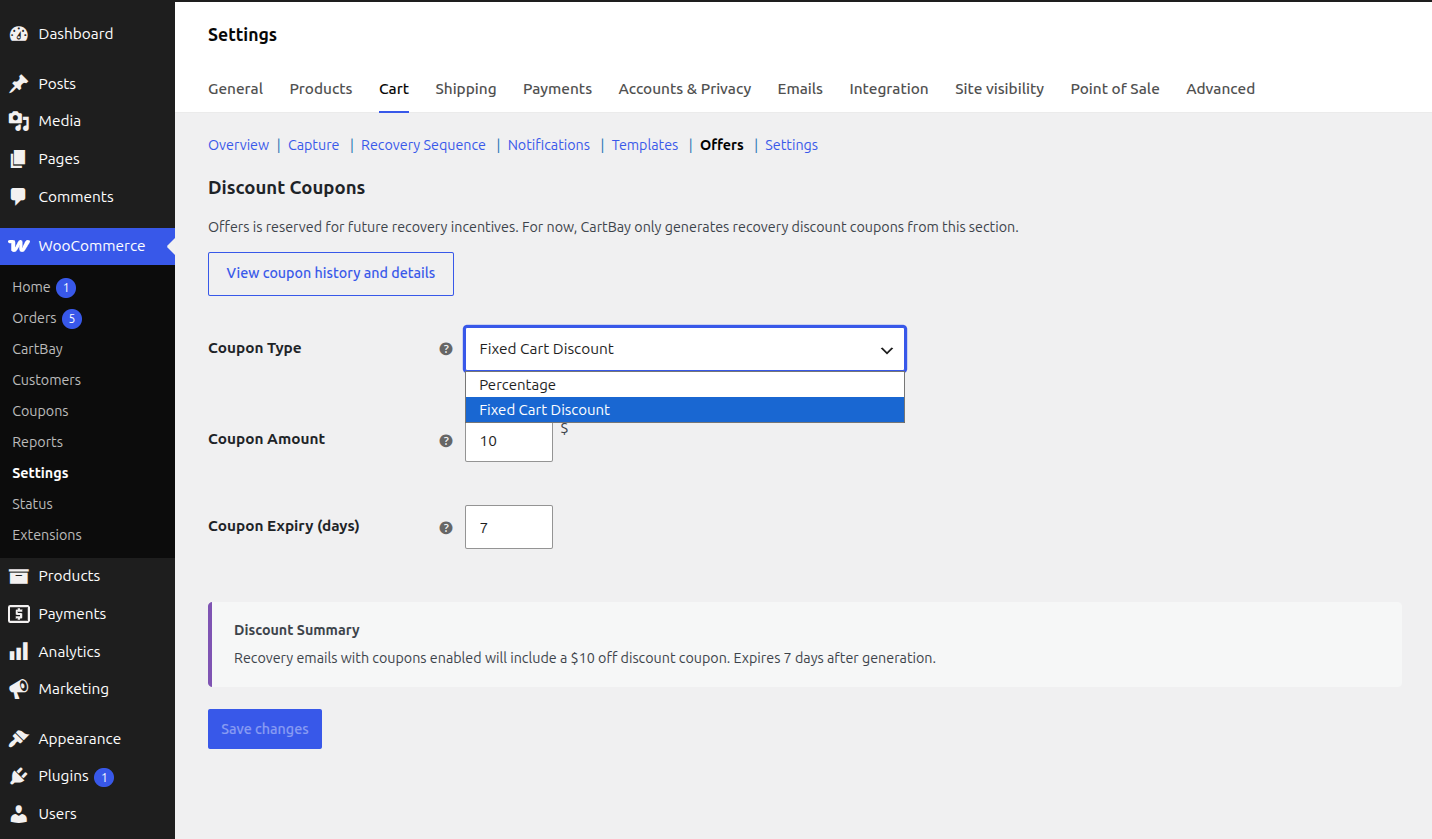
The Offers section controls the coupon CartBay adds to recovery emails when a recovery step includes one. In CartBay Free, Offers holds a single static coupon code that references an existing WooCommerce coupon. CartBay Pro replaces it with unique, per-session generated coupons.
Where to Find It
Section titled “Where to Find It”Open WooCommerce > CartBay > Offers.
Purpose
Section titled “Purpose”Offers defines the incentive used by coupon-enabled recovery emails. The Recovery Sequence decides which email steps include a coupon; Offers decides which coupon code those steps insert.
Static Coupon Code
Section titled “Static Coupon Code”In CartBay Free, Offers is a single static coupon code field, stored in cartbay_settings[static_coupon_code].
- Enter the code of an existing WooCommerce coupon you have already created under
Marketing > Coupons. - When a recovery step has
Include a recovery couponenabled, CartBay inserts this code into that email as plain text through the{coupon_code}placeholder. - CartBay Free does not generate, modify, restrict, or expire the coupon. Its discount type, amount, usage limits, and expiry date are whatever you configured on the WooCommerce coupon itself.
- The same static code is used for every coupon-enabled step and every recovery session, and shoppers enter it manually at checkout.
Coupon Setup Checks
Section titled “Coupon Setup Checks”CartBay reviews your recovery coupon configuration and shows a notice on the CartBay settings screens when something needs your attention:
- A recovery email has Include a recovery coupon enabled, but no coupon code is set in Offers. The notice names the email step(s) so you know where to add one.
- The configured code has no matching WooCommerce coupon (it was never created, or the coupon is a draft or in the trash).
- The coupon has expired.
- The coupon has reached its usage limit.
- The coupon is restricted to specific email addresses. Abandoned-cart shoppers rarely match, so it will usually fail — use an unrestricted coupon for recovery emails.
A coupon with cart restrictions (a minimum spend, or specific products or categories) shows an informational note instead: WooCommerce enforces those at checkout, so some shoppers may not qualify.
Safe Send-Time Handling
Section titled “Safe Send-Time Handling”If the configured coupon is missing or clearly unusable at the moment an email is sent — no matching coupon, expired, or out of uses — CartBay leaves it out of that recovery email instead of sending a code that would fail at checkout. The email still goes out; it just omits the broken discount, and the omission is recorded in the session’s event history.
This matters most later in a sequence: a coupon that was valid when you set it up can expire or run out of uses before the final email is sent, and this check catches that automatically.
Dynamic Recovery Coupons Pro
Section titled “Dynamic Recovery Coupons Pro”With CartBay Pro, coupon-enabled recovery steps generate a unique coupon per session instead of inserting the static code.
Generated coupon behavior:
- Code prefix is
CARTBAY-followed by 8 random alphanumeric characters, unique to the session. - One coupon is generated per CartBay session.
- Coupons are single-use and individual-use.
- Coupons are restricted to the captured email address.
- Coupons carry an expiry date and are applied automatically when the shopper restores the cart from a recovery email.
- Session meta stores
_cartbay_coupon_codeand_cartbay_coupon_expires_at; the coupon stores its CartBay session and generated-coupon context. - The
{coupon_code}and{coupon_expiry}placeholders resolve to the generated coupon and its expiry.
The shipped version of CartBay Pro generates fixed-cart coupons worth 10 in store currency with a 7-day expiry. These generation defaults are fixed — there is no coupon type, amount, or expiry configuration screen.
Coupon Validation Pro
Section titled “Coupon Validation Pro”CartBay Pro validates each generated coupon against the restored session identity and the restored/checkout email, so a recovery coupon cannot be used outside its matching recovery flow. CartBay Pro also avoids applying recovery coupons when the cart contains WooCommerce Subscription products or subscription variations.
Coupon History Pro
Section titled “Coupon History Pro”CartBay Pro adds a read-only Coupon History view, opened with the View coupon history and details button, showing generated coupons with recovery context.
Summary cards:
- Generated.
- Active.
- Used.
- Expired.
Table data:
- Masked coupon code.
- CartBay session.
- Discount.
- Usage.
- Expiry.
- Status.
The More action expands row-level details such as full code, generated email, email restrictions, restore click timestamp, recovered order, and session recovery events.
Best Practices
Section titled “Best Practices”- In CartBay Free, create the WooCommerce coupon first and keep its own usage limits and expiry conservative, since the same static code is shared across every recovery email.
- Use coupons later in the sequence unless the store has a proven first-email discount strategy.
- Avoid percentage or high-value discounts on low-margin products.
- With CartBay Pro, review Coupon History before changing your discount strategy.