---
title: "Member approval and community moderators"
description: "Approve new members, suspend and restore accounts, and add community moderators."
---
## Member approval and suspension
With **Approve new members before they can take part** on, people who sign up can log in but see a message that their account is waiting for approval. They can read public content like a visitor, but cannot post, comment, react, join spaces or see the member directory. Moderators approve or decline them on **Moderation → New members**; approved members get a notification and an email. Turning the setting on does not affect existing members.
 *A new member waiting for approval.*
Suspended members (declined sign-ups and members suspended after a report) see a message that their account is suspended and use the community like a visitor. Restore them on **Moderation → Suspended**. Administrators and community moderators cannot be suspended. Administrators also see members' email addresses on these lists; moderators do not.
*A new member waiting for approval.*
Suspended members (declined sign-ups and members suspended after a report) see a message that their account is suspended and use the community like a visitor. Restore them on **Moderation → Suspended**. Administrators and community moderators cannot be suspended. Administrators also see members' email addresses on these lists; moderators do not.
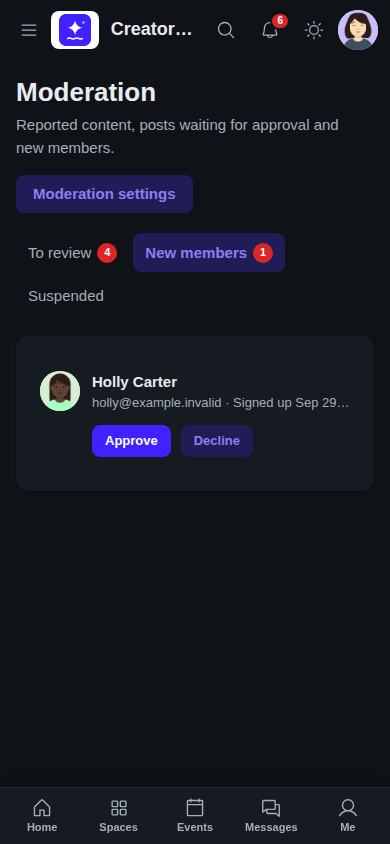 *The Moderation page on a phone.*
When a community is set to **Logged-in members only**, waiting and suspended members see only the message.
## Community moderators
Add moderators in **SpaceBay → Members → Community moderators**: search for a member and select **Make moderator**. Moderators review reports, held content and new members, and can edit, pin or delete content in every space, but cannot change settings or open the SpaceBay admin. Administrators are always moderators. Technically, moderators get the `spacebay_moderate` capability, so you can also give it to a whole role with a role editor plugin.
*The Moderation page on a phone.*
When a community is set to **Logged-in members only**, waiting and suspended members see only the message.
## Community moderators
Add moderators in **SpaceBay → Members → Community moderators**: search for a member and select **Make moderator**. Moderators review reports, held content and new members, and can edit, pin or delete content in every space, but cannot change settings or open the SpaceBay admin. Administrators are always moderators. Technically, moderators get the `spacebay_moderate` capability, so you can also give it to a whole role with a role editor plugin.
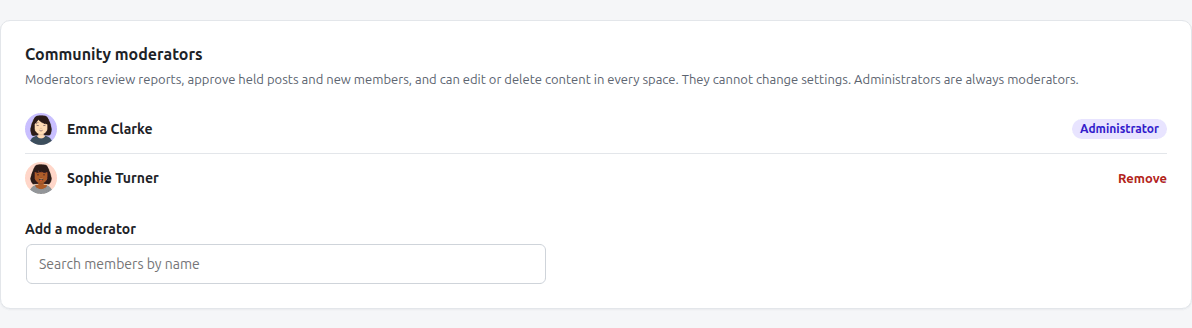 *SpaceBay → Members → Community moderators.*
Each space can also have its own admins and moderators, chosen on the space's **Members** tab. They can edit and delete posts and comments in that space, and their own posts are never held for review.
*SpaceBay → Members → Community moderators.*
Each space can also have its own admins and moderators, chosen on the space's **Members** tab. They can edit and delete posts and comments in that space, and their own posts are never held for review.