---
title: "The community portal"
description: "A tour of the SpaceBay community portal: three-column layout, header, bottom tab bar, dark mode, phones and page caching."
---
The portal is a fast single-page app. It works on phones, supports right-to-left languages and has a dark mode. The left column holds the navigation and the spaces list, the centre shows the feed or page, and a right rail shows short community cards. The header greets the member and shows search, notifications, the colour mode button and the account menu. On Home, logged-in members see their own activity: posts, comments, likes received and spaces joined.
Video (23 s): a quick tour of Home, Spaces, Events, Members and the Leaderboard.
*Dark mode.*
*The portal on a phone.*
:::note
Page-cache plugins: SpaceBay marks portal pages as not cacheable (`DONOTCACHEPAGE` and no-cache headers), so members always see their own data.
:::
## Where things are
On a computer screen the portal has three columns.
**Left: the navigation.**
- At the top: **Home**, **Messages** (for active members, when messages are on), **Events** (when events are on), **Leaderboard** (for active members, when the leaderboard is on) and **Saved** (for active members). Add-ons can add items here; SpaceBay Pro adds **Shop**. Moderators and administrators also see **Moderation**, with a count of items to review.
- In the middle, a scrolling list of your spaces under their group headings. Invitations come first, and a lock marks spaces that are not public.
- Pinned at the bottom, always in view: **Spaces**, **Members** (for active members, when the member directory is on) and, for logged-in members, **Account settings** and **Log out**.
**Centre: the feed or page.** On Home this is the post box and the feed. The header above it greets the member and shows search, notifications, the colour mode button and the account menu. Visitors who are not logged in see **Log in** and, when sign-up is open, **Join**.
**Right: the rail.** On Home it holds short cards that fill in after the page loads:
| Card | Logged-in members | Visitors who are not logged in |
| --- | --- | --- |
| Upcoming events | The next 3, with a **See all events** link. | The same, unless the community is members-only. |
| Top members this week | The top 5 with their points, and **See the leaderboard**. Only when the leaderboard is on. | Not shown. |
| New members | Up to 5 recent members, and **See all members**. Only when the member directory is on. | Not shown. |
| Your spaces | Up to 6 spaces you joined, or other spaces if you have joined none, and **Browse all spaces**. | Titled **Spaces**: up to 6 spaces, and **Browse all spaces**. |
A card with nothing to show is left out. On a space page the rail shows **About this space** (description, number of members, who can join and the date it was created) and the space's upcoming events. On the Events page it shows **Up next**. On medium-sized screens the rail moves below the feed, and on phones it is hidden on Home.
**On phones** the left column opens from the **Menu** button, and a tab bar at the bottom of the screen shows **Home**, **Spaces**, **Events** (when events are on), **Messages** (for active members, when messages are on) and **Me**. Visitors see **Log in** instead of **Me**. The bar slides out of the way while you type in a text box.
On **Home**, logged-in members also see their own activity: posts, comments, likes received and spaces joined.
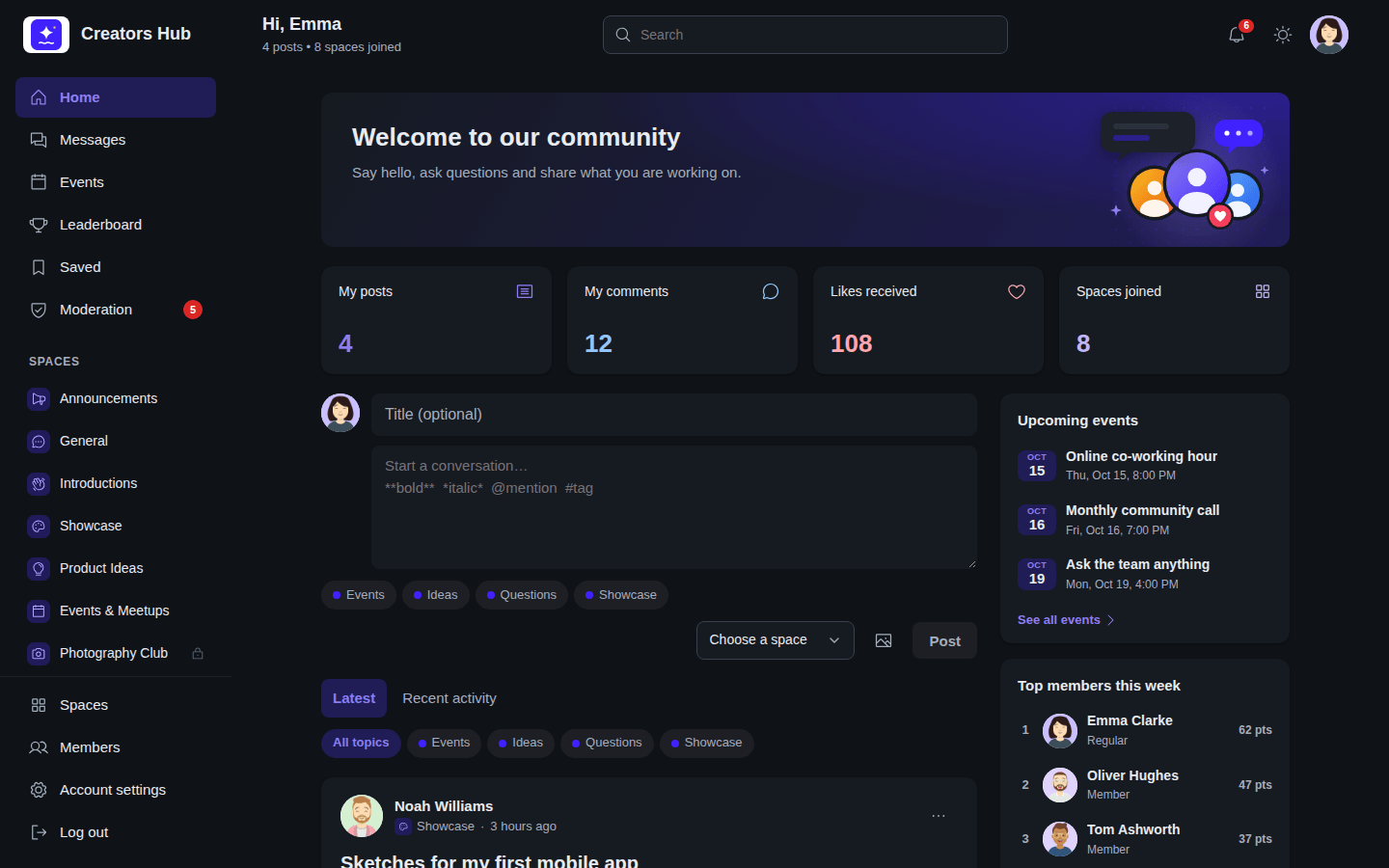 *Dark mode.*
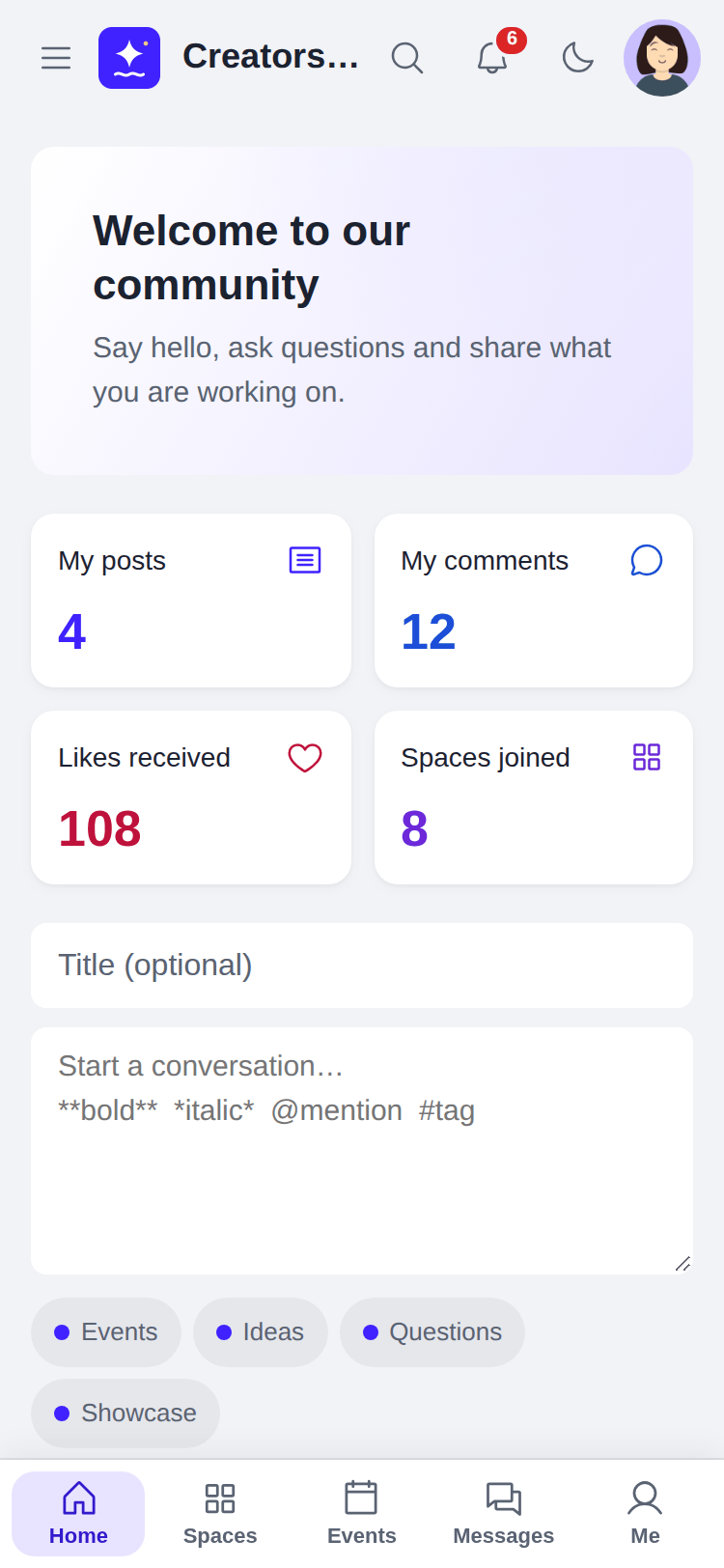 *The portal on a phone.*
:::note
Page-cache plugins: SpaceBay marks portal pages as not cacheable (`DONOTCACHEPAGE` and no-cache headers), so members always see their own data.
:::
## Where things are
On a computer screen the portal has three columns.
**Left: the navigation.**
- At the top: **Home**, **Messages** (for active members, when messages are on), **Events** (when events are on), **Leaderboard** (for active members, when the leaderboard is on) and **Saved** (for active members). Add-ons can add items here; SpaceBay Pro adds **Shop**. Moderators and administrators also see **Moderation**, with a count of items to review.
- In the middle, a scrolling list of your spaces under their group headings. Invitations come first, and a lock marks spaces that are not public.
- Pinned at the bottom, always in view: **Spaces**, **Members** (for active members, when the member directory is on) and, for logged-in members, **Account settings** and **Log out**.
**Centre: the feed or page.** On Home this is the post box and the feed. The header above it greets the member and shows search, notifications, the colour mode button and the account menu. Visitors who are not logged in see **Log in** and, when sign-up is open, **Join**.
**Right: the rail.** On Home it holds short cards that fill in after the page loads:
| Card | Logged-in members | Visitors who are not logged in |
| --- | --- | --- |
| Upcoming events | The next 3, with a **See all events** link. | The same, unless the community is members-only. |
| Top members this week | The top 5 with their points, and **See the leaderboard**. Only when the leaderboard is on. | Not shown. |
| New members | Up to 5 recent members, and **See all members**. Only when the member directory is on. | Not shown. |
| Your spaces | Up to 6 spaces you joined, or other spaces if you have joined none, and **Browse all spaces**. | Titled **Spaces**: up to 6 spaces, and **Browse all spaces**. |
A card with nothing to show is left out. On a space page the rail shows **About this space** (description, number of members, who can join and the date it was created) and the space's upcoming events. On the Events page it shows **Up next**. On medium-sized screens the rail moves below the feed, and on phones it is hidden on Home.
**On phones** the left column opens from the **Menu** button, and a tab bar at the bottom of the screen shows **Home**, **Spaces**, **Events** (when events are on), **Messages** (for active members, when messages are on) and **Me**. Visitors see **Log in** instead of **Me**. The bar slides out of the way while you type in a text box.
On **Home**, logged-in members also see their own activity: posts, comments, likes received and spaces joined.
*The portal on a phone.*
:::note
Page-cache plugins: SpaceBay marks portal pages as not cacheable (`DONOTCACHEPAGE` and no-cache headers), so members always see their own data.
:::
## Where things are
On a computer screen the portal has three columns.
**Left: the navigation.**
- At the top: **Home**, **Messages** (for active members, when messages are on), **Events** (when events are on), **Leaderboard** (for active members, when the leaderboard is on) and **Saved** (for active members). Add-ons can add items here; SpaceBay Pro adds **Shop**. Moderators and administrators also see **Moderation**, with a count of items to review.
- In the middle, a scrolling list of your spaces under their group headings. Invitations come first, and a lock marks spaces that are not public.
- Pinned at the bottom, always in view: **Spaces**, **Members** (for active members, when the member directory is on) and, for logged-in members, **Account settings** and **Log out**.
**Centre: the feed or page.** On Home this is the post box and the feed. The header above it greets the member and shows search, notifications, the colour mode button and the account menu. Visitors who are not logged in see **Log in** and, when sign-up is open, **Join**.
**Right: the rail.** On Home it holds short cards that fill in after the page loads:
| Card | Logged-in members | Visitors who are not logged in |
| --- | --- | --- |
| Upcoming events | The next 3, with a **See all events** link. | The same, unless the community is members-only. |
| Top members this week | The top 5 with their points, and **See the leaderboard**. Only when the leaderboard is on. | Not shown. |
| New members | Up to 5 recent members, and **See all members**. Only when the member directory is on. | Not shown. |
| Your spaces | Up to 6 spaces you joined, or other spaces if you have joined none, and **Browse all spaces**. | Titled **Spaces**: up to 6 spaces, and **Browse all spaces**. |
A card with nothing to show is left out. On a space page the rail shows **About this space** (description, number of members, who can join and the date it was created) and the space's upcoming events. On the Events page it shows **Up next**. On medium-sized screens the rail moves below the feed, and on phones it is hidden on Home.
**On phones** the left column opens from the **Menu** button, and a tab bar at the bottom of the screen shows **Home**, **Spaces**, **Events** (when events are on), **Messages** (for active members, when messages are on) and **Me**. Visitors see **Log in** instead of **Me**. The bar slides out of the way while you type in a text box.
On **Home**, logged-in members also see their own activity: posts, comments, likes received and spaces joined.