---
title: VIP Tiers
description: Reward your most loyal customers with membership tiers that earn points faster.
---
:::note[Pro feature]
VIP Tiers are part of **PointBay Pro**. You'll need the Pro add-on active to configure tiers and give members a faster earning rate.
:::
VIP Tiers let you group customers into membership levels for example Bronze, Silver, and Gold and reward your most loyal shoppers with an **earning multiplier** that makes every purchase they make earn points faster. It's a way to give your best customers a visible reason to keep coming back instead of shopping elsewhere. Customers move up (and, if they go quiet, back down) automatically, with no manual work on your part.
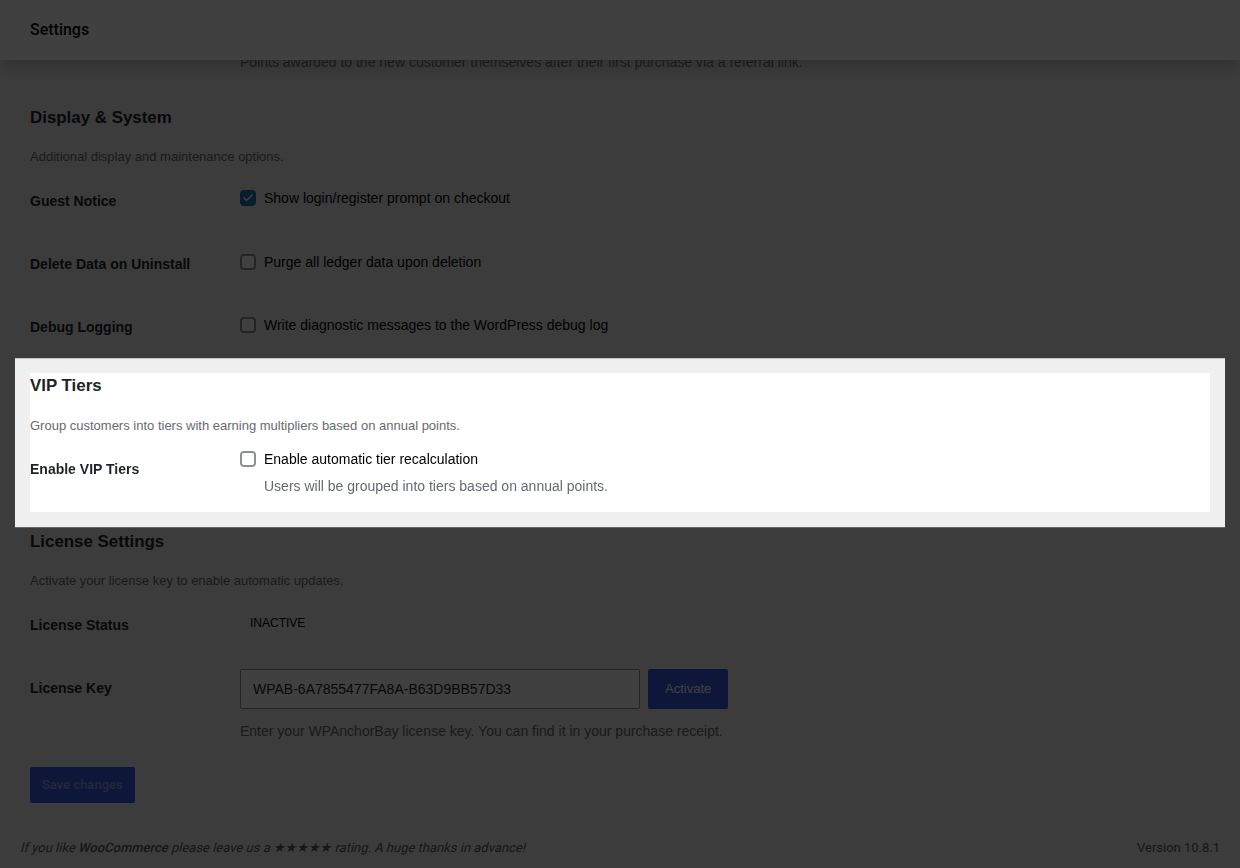
The **Enable VIP Tiers** toggle and the tier editor both live at **WooCommerce → Settings → Loyalty Points**, under the **VIP Tiers** group turning the toggle on reveals the editor right there on the same page. The separate **Referrals & Tiers** admin page only shows a read-only summary of your configured tiers, with a link back to this settings screen to make changes. Full field details are in the [Settings Reference](/pointbay/admin/settings-reference/#vip-tiers).
---
## How It Works
- **Qualifying for a tier.** A customer's tier is based on the points they've **earned in the last 365 days** a rolling window, not their current spendable balance. This means members need to stay active to keep their status: points earned more than a year ago stop counting toward their tier, even if they haven't spent them.
- **Earning faster.** When a member makes a purchase, their tier's multiplier is applied on top of the normal Points Per Dollar rate.
- **Automatic updates.** A customer is promoted the moment they cross a threshold. Every customer's tier is also re-checked automatically once a day, so members who drop below a threshold because their older points aged out of the 365-day window are moved down to the correct tier without you having to intervene.
---
## Walkthrough: Turn On Tiers and Set Your Thresholds
1. Go to **WooCommerce → Settings → Loyalty Points**, in the **VIP Tiers** group.
2. Turn on **Enable VIP Tiers** the tier editor appears directly below the toggle, pre-filled with three starter tiers.
3. Each row is one tier with three fields, in this order: **Tier Name**, **Points Threshold** (points per year needed to reach it), and **Multiplier**. The rows don't have a persistent column header above them only placeholder text inside each empty field so remember the order is always Name → Threshold → Multiplier.
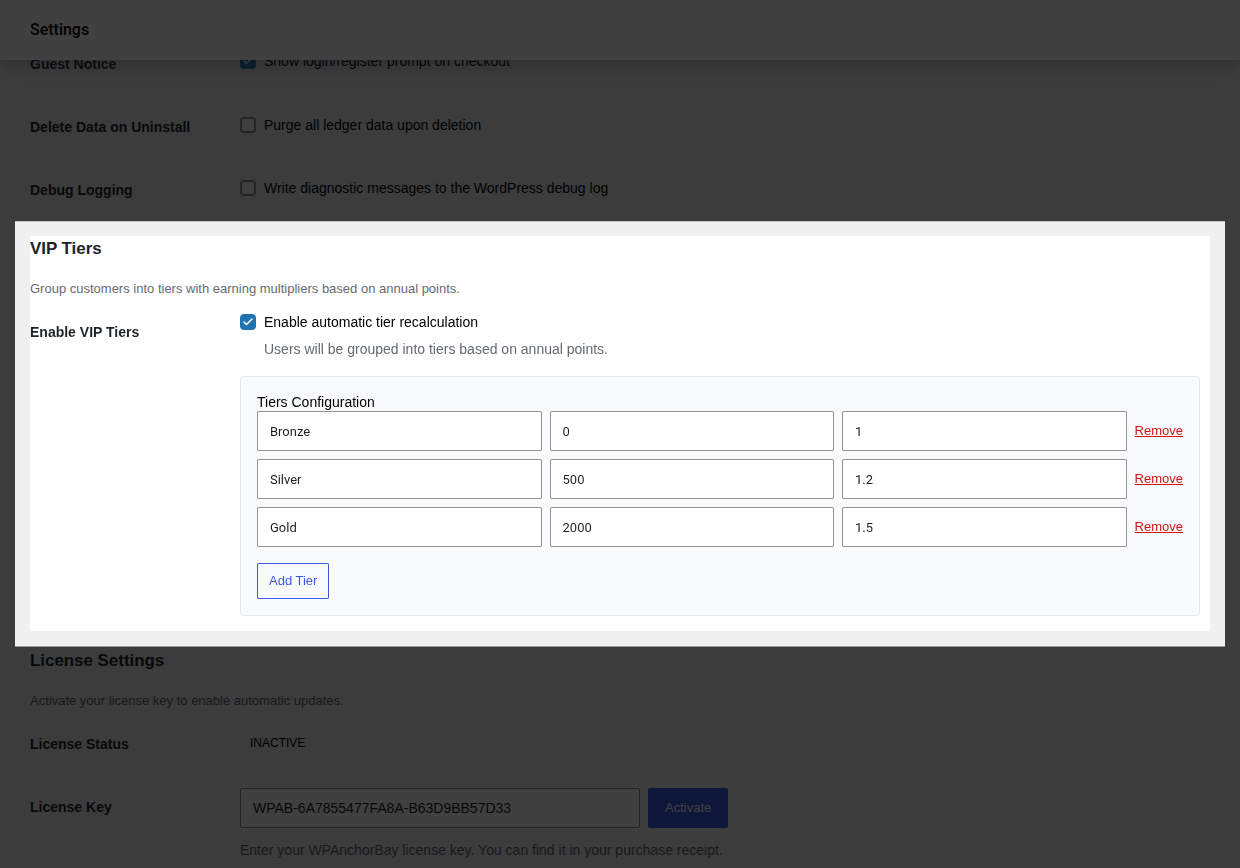 4. Edit the starter tiers to match your program, or use **Add Tier** / **Remove** to change how many tiers you offer.
5. Click **Save changes** at the bottom of the page there's no separate save for this group.
6. **Verify it worked:** place a test order as a customer who qualifies for a non-Bronze tier and confirm in [Points History](/pointbay/admin/points-history/) that the multiplier was applied to the credited amount. You can also check **WooCommerce → Referrals & Tiers** for a read-only summary of your configured tiers.
---
## Starter Tiers
PointBay Pro ships with a ready-to-use set of three tiers that you're free to rename, re-threshold, remove, or add to:
| Tier | Points needed (per year) | Earning multiplier |
|---|---|---|
| **Bronze** | 0 | 1.0× (standard rate) |
| **Silver** | 500 | 1.2× (20% faster) |
| **Gold** | 2,000 | 1.5× (50% faster) |
4. Edit the starter tiers to match your program, or use **Add Tier** / **Remove** to change how many tiers you offer.
5. Click **Save changes** at the bottom of the page there's no separate save for this group.
6. **Verify it worked:** place a test order as a customer who qualifies for a non-Bronze tier and confirm in [Points History](/pointbay/admin/points-history/) that the multiplier was applied to the credited amount. You can also check **WooCommerce → Referrals & Tiers** for a read-only summary of your configured tiers.
---
## Starter Tiers
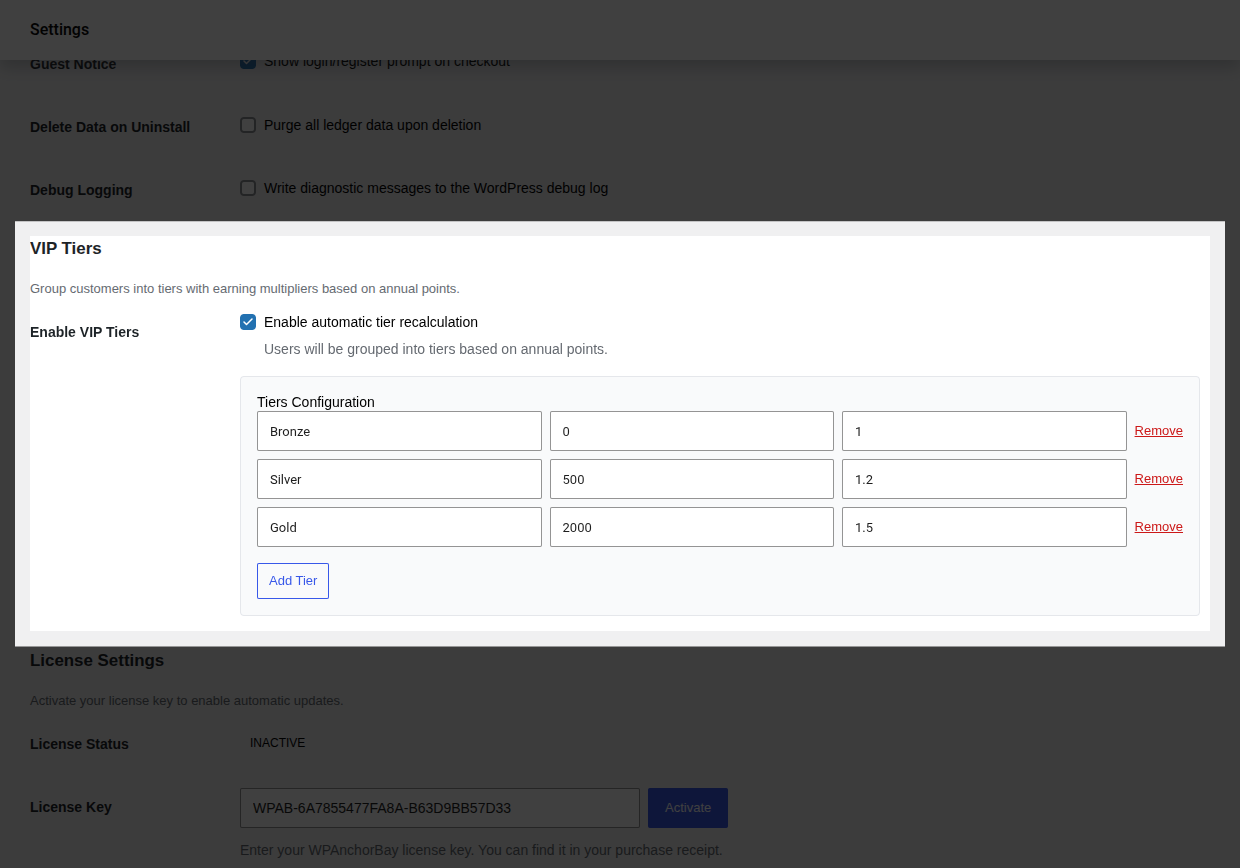
PointBay Pro ships with a ready-to-use set of three tiers that you're free to rename, re-threshold, remove, or add to:
| Tier | Points needed (per year) | Earning multiplier |
|---|---|---|
| **Bronze** | 0 | 1.0× (standard rate) |
| **Silver** | 500 | 1.2× (20% faster) |
| **Gold** | 2,000 | 1.5× (50% faster) |
 ---
## Worked Examples
**Example 1 a Gold member's purchase.** A **Gold** member (1.5×) places a $100 order at the default rate of 1 point per $1. Instead of the standard 100 points, they earn **150 points**.
**Example 2 a member drops a tier.** A Silver member (1.2×) earned 600 points 13 months ago and nothing since. Because those points have aged out of the 365-day qualifying window, the next daily tier check moves them back down to Bronze (1.0×) until they earn again.
---
## Edge Cases & Interactions
- Tier multipliers apply only to **purchase** points (see [Earning Points](/pointbay/features/earning-points/)) registration and review bonuses are always credited at their flat configured amount, unaffected by tier.
- If a purchase that benefited from a multiplier is later refunded, the reversal removes exactly what was credited (the multiplied amount), not a recalculated non-multiplied amount.
- Customers see their current tier and progress toward the next one on their [Customer Dashboard](/pointbay/features/customer-dashboard/).
---
## Troubleshooting
- **A customer's tier didn't update after a big purchase** tier promotions on crossing a threshold are immediate, but if it still looks wrong, confirm **Enable VIP Tiers** is actually on; the setting can be saved off after testing and forgotten.
- **A loyal customer got demoted unexpectedly** check whether their qualifying points simply aged out of the 365-day window; this is expected behavior, not a bug.
- **The tier editor rows are confusing** remember the fixed left-to-right order: Name, Threshold, Multiplier.
See [Troubleshooting](/pointbay/resources/troubleshooting/) for more general issues.
## Related
- [Earning Points](/pointbay/features/earning-points/)
- [Referral Program](/pointbay/features/referral-program/)
- [Customer Dashboard](/pointbay/features/customer-dashboard/)
- [Settings Reference](/pointbay/admin/settings-reference/)
---
## Worked Examples
**Example 1 a Gold member's purchase.** A **Gold** member (1.5×) places a $100 order at the default rate of 1 point per $1. Instead of the standard 100 points, they earn **150 points**.
**Example 2 a member drops a tier.** A Silver member (1.2×) earned 600 points 13 months ago and nothing since. Because those points have aged out of the 365-day qualifying window, the next daily tier check moves them back down to Bronze (1.0×) until they earn again.
---
## Edge Cases & Interactions
- Tier multipliers apply only to **purchase** points (see [Earning Points](/pointbay/features/earning-points/)) registration and review bonuses are always credited at their flat configured amount, unaffected by tier.
- If a purchase that benefited from a multiplier is later refunded, the reversal removes exactly what was credited (the multiplied amount), not a recalculated non-multiplied amount.
- Customers see their current tier and progress toward the next one on their [Customer Dashboard](/pointbay/features/customer-dashboard/).
---
## Troubleshooting
- **A customer's tier didn't update after a big purchase** tier promotions on crossing a threshold are immediate, but if it still looks wrong, confirm **Enable VIP Tiers** is actually on; the setting can be saved off after testing and forgotten.
- **A loyal customer got demoted unexpectedly** check whether their qualifying points simply aged out of the 365-day window; this is expected behavior, not a bug.
- **The tier editor rows are confusing** remember the fixed left-to-right order: Name, Threshold, Multiplier.
See [Troubleshooting](/pointbay/resources/troubleshooting/) for more general issues.
## Related
- [Earning Points](/pointbay/features/earning-points/)
- [Referral Program](/pointbay/features/referral-program/)
- [Customer Dashboard](/pointbay/features/customer-dashboard/)
- [Settings Reference](/pointbay/admin/settings-reference/)