---
title: Referral Program
description: Reward customers for referring friends to your store with the built-in refer-a-friend program.
---
:::note
The core Referral Program referral links, the referrer's bonus, and the Refer a Friend card on the customer dashboard is **built into the free plugin**. **PointBay Pro** adds one thing on top: an optional welcome bonus paid to the *new* customer who was referred.
:::
The Referral Program turns your existing customers into advocates for your store. Each customer gets a personal referral link to share; when a friend uses it to sign up and place their first order, the referring customer earns bonus points and you can optionally reward the new customer too, giving both sides a reason to make the introduction happen.
The **Enable Referrals** toggle and the referrer's bonus amount live at **WooCommerce → Settings → Loyalty Points**, under the **Referrals** group (this group is shared with the free plugin, which owns the referrer-side settings). Full field details are in the [Settings Reference](/pointbay/admin/settings-reference/#referrals).
---
## How It Works
1. **Share** a logged-in customer copies their referral link from the **Refer a Friend** card on their [Customer Dashboard](/pointbay/features/customer-dashboard/).
2. **Visit** a friend clicks the link and arrives at your store. PointBay remembers the referral for 30 days, even if the friend doesn't buy immediately.
3. **Register** the friend creates an account.
4. **Purchase** the friend completes their first order.
5. **Reward** the referring customer receives their **Referral Bonus Points**, and the new customer receives their own **New Customer Bonus Points** welcome bonus, if you've set one above `0`.
Rewards are paid out **once per referred customer**, on their first completed order only later orders from the same friend don't earn the referrer any more points.
---
## Walkthrough: Turn On Referrals
1. Go to **WooCommerce → Settings → Loyalty Points**, in the **Referrals** group.
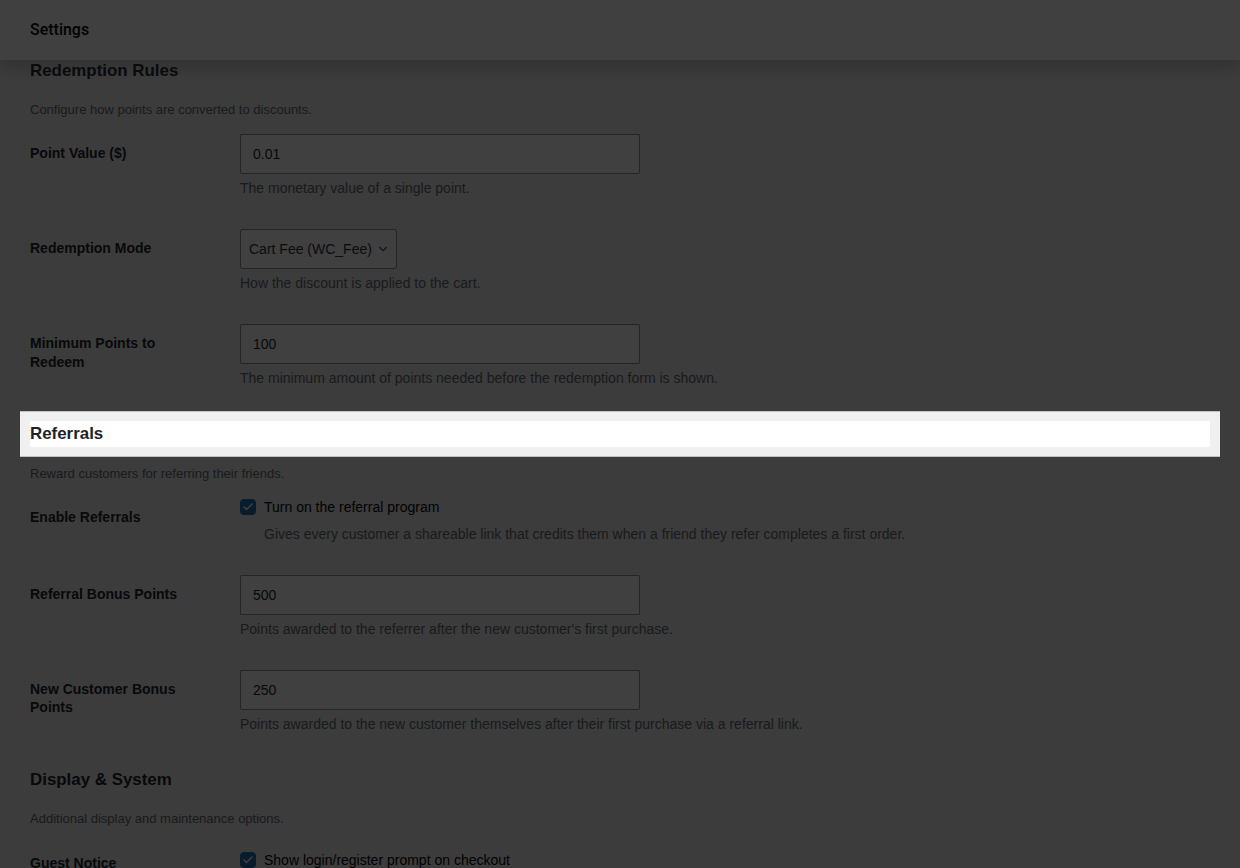
2. Turn on **Enable Referrals**.
3. Set **Referral Bonus Points** to what you want the referrer to earn (the default is `1000`).
4. With **PointBay Pro** active, also set **New Customer Bonus Points** to what the new customer should earn as a welcome bonus (the default is `100`) or leave it at `0` to reward only the referrer. This field doesn't appear at all without Pro.
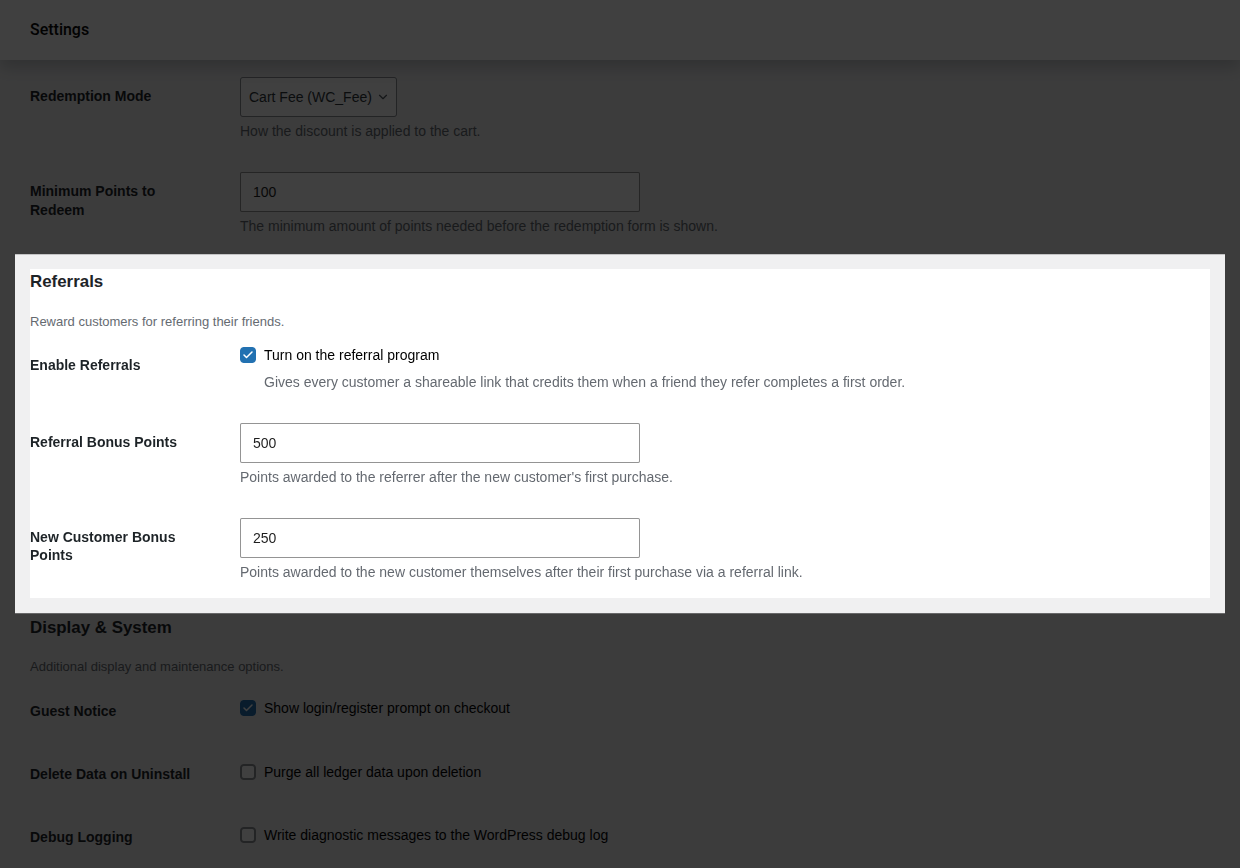 5. Click **Save changes**.
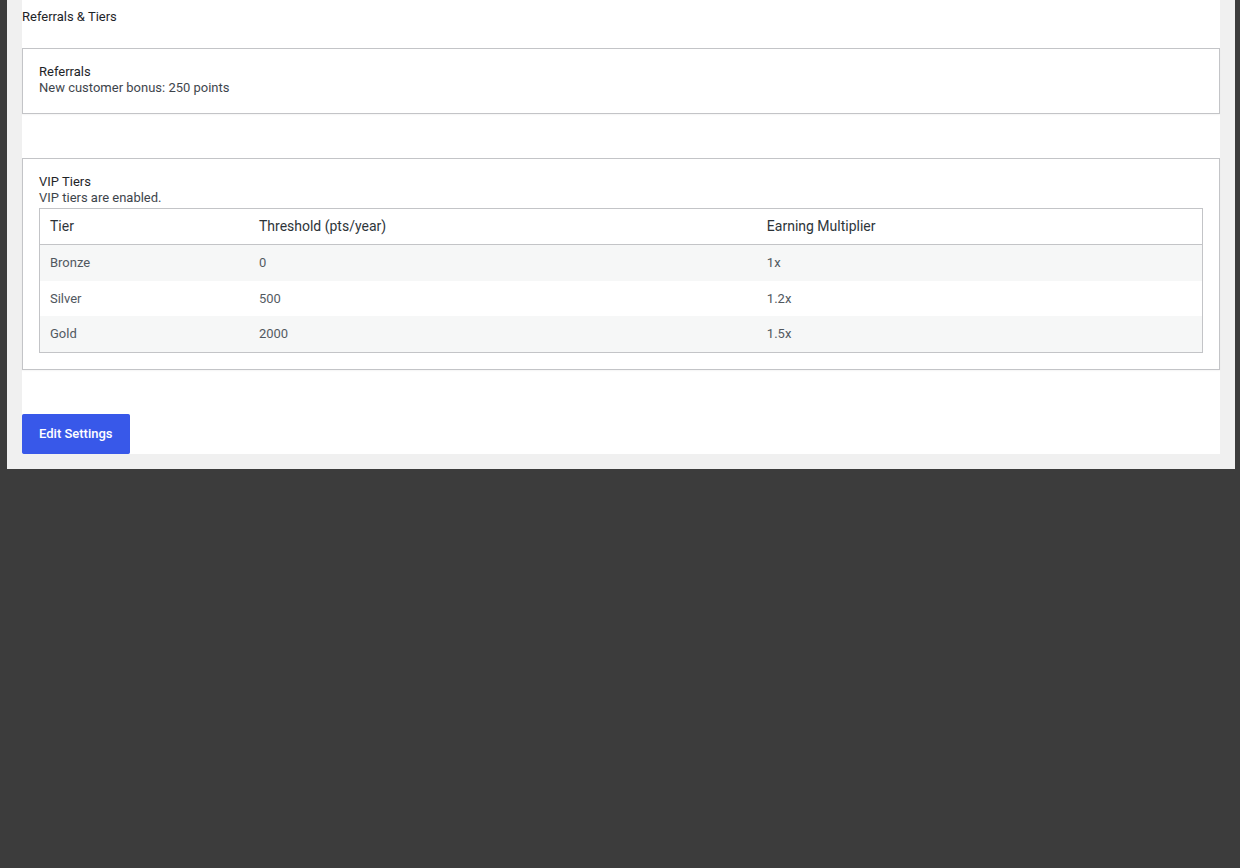
6. **Verify it worked:** with Pro active, go to **WooCommerce → Referrals & Tiers** and confirm the page reflects your configured new-customer bonus amount.
---
## Worked Examples
**Example 1 a successful referral, defaults.** Priya shares her referral link. Her friend Marcus clicks it, registers, and places his first order two weeks later. PointBay credits Priya **1,000 points** (Referral Bonus Points) and Marcus **100 points** (New Customer Bonus Points) both the moment Marcus's order is completed.
**Example 2 a referred order is refunded.** If Marcus's qualifying order is fully refunded before or after the bonuses were paid, PointBay automatically reverses **both** bonuses: Priya's 1,000 points and Marcus's 100 points are debited back out, each recorded as its own reversal entry in Points History.
---
## Reward Rules
- **One reward per friend.** A referrer is rewarded only on a referred friend's *first* completed order never on that friend's later purchases.
- **No self-referrals.** A customer can't earn a bonus by using their own referral link.
- **Reversals.** If the qualifying first order is later cancelled, fails, or is fully refunded, both the referrer's bonus and the new customer's welcome bonus are automatically taken back. **Partial** refunds, unlike with regular purchase points, don't affect the referral reward it's all-or-nothing based on whether the order is still a completed, non-refunded order.
All referral rewards and reversals appear in [Points History](/pointbay/admin/points-history/), labeled **Referral Bonus** / **Referral Reversal** for the referrer's side and **Referral Signup Bonus** / **Referral Signup Reversal** for the new customer's welcome bonus.
---
## Overview Page
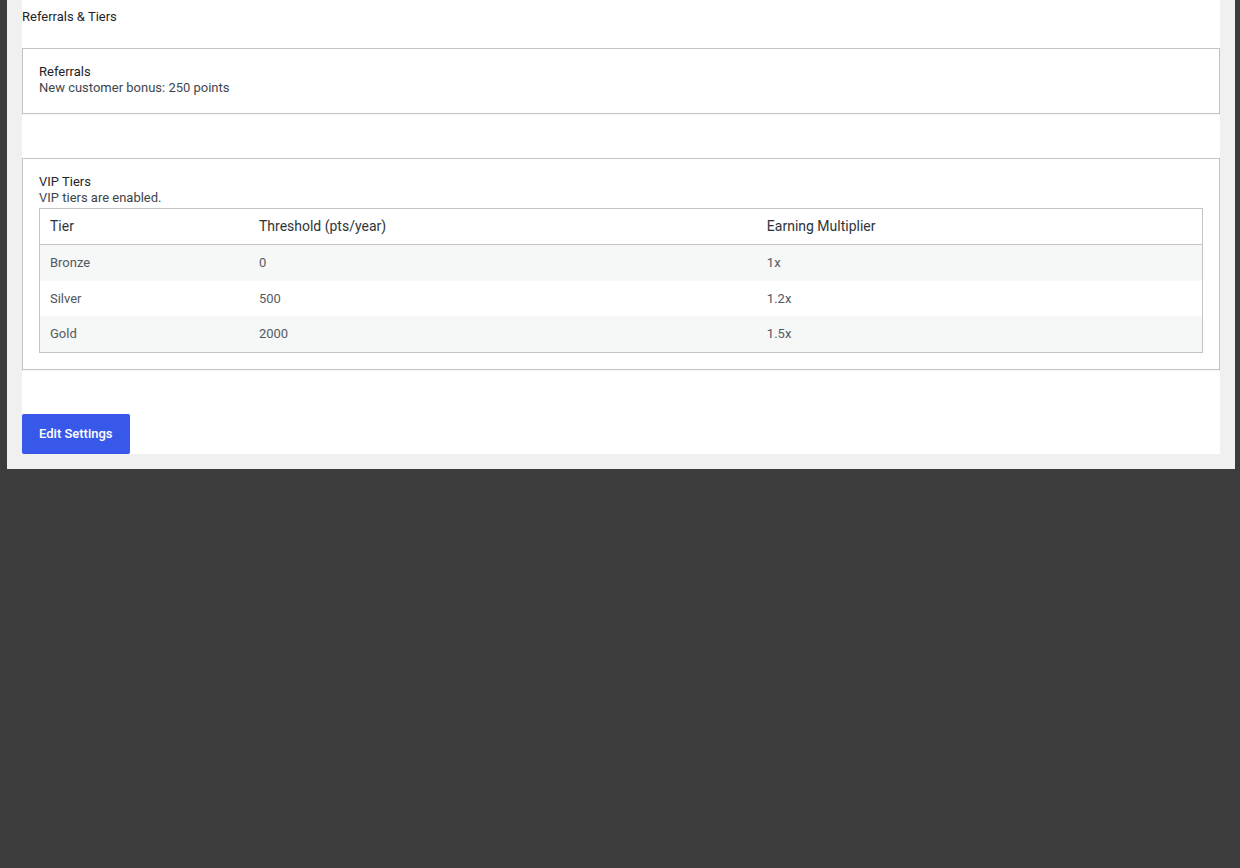
With Pro active, **WooCommerce → Referrals & Tiers** gives you a read-only summary of your referral and tier setup at a glance including the current new-customer bonus amount and whether VIP Tiers are enabled with an **Edit Settings** link that takes you back to the settings screen to make changes.
5. Click **Save changes**.
6. **Verify it worked:** with Pro active, go to **WooCommerce → Referrals & Tiers** and confirm the page reflects your configured new-customer bonus amount.

---
## Worked Examples
**Example 1 a successful referral, defaults.** Priya shares her referral link. Her friend Marcus clicks it, registers, and places his first order two weeks later. PointBay credits Priya **1,000 points** (Referral Bonus Points) and Marcus **100 points** (New Customer Bonus Points) both the moment Marcus's order is completed.
**Example 2 a referred order is refunded.** If Marcus's qualifying order is fully refunded before or after the bonuses were paid, PointBay automatically reverses **both** bonuses: Priya's 1,000 points and Marcus's 100 points are debited back out, each recorded as its own reversal entry in Points History.
---
## Reward Rules
- **One reward per friend.** A referrer is rewarded only on a referred friend's *first* completed order never on that friend's later purchases.
- **No self-referrals.** A customer can't earn a bonus by using their own referral link.
- **Reversals.** If the qualifying first order is later cancelled, fails, or is fully refunded, both the referrer's bonus and the new customer's welcome bonus are automatically taken back. **Partial** refunds, unlike with regular purchase points, don't affect the referral reward it's all-or-nothing based on whether the order is still a completed, non-refunded order.
All referral rewards and reversals appear in [Points History](/pointbay/admin/points-history/), labeled **Referral Bonus** / **Referral Reversal** for the referrer's side and **Referral Signup Bonus** / **Referral Signup Reversal** for the new customer's welcome bonus.
---
## Overview Page
With Pro active, **WooCommerce → Referrals & Tiers** gives you a read-only summary of your referral and tier setup at a glance including the current new-customer bonus amount and whether VIP Tiers are enabled with an **Edit Settings** link that takes you back to the settings screen to make changes.
 ---
## Troubleshooting
- **A referral link didn't credit anyone** confirm the friend actually completed checkout, not just visited; no order means no reward. Also confirm the 30-day tracking window hadn't already expired.
- **The referrer wasn't rewarded but the friend definitely bought something** check whether this was that friend's first order ever, since only a first order qualifies.
- **Both bonuses vanished after a refund** this is expected: a full refund on the qualifying order reverses both sides of the referral reward.
See [Troubleshooting](/pointbay/resources/troubleshooting/) for more general issues.
## Related
- [Customer Dashboard](/pointbay/features/customer-dashboard/)
- [VIP Tiers](/pointbay/features/vip-tiers/)
- [Points History](/pointbay/admin/points-history/)
- [Settings Reference](/pointbay/admin/settings-reference/)
---
## Troubleshooting
- **A referral link didn't credit anyone** confirm the friend actually completed checkout, not just visited; no order means no reward. Also confirm the 30-day tracking window hadn't already expired.
- **The referrer wasn't rewarded but the friend definitely bought something** check whether this was that friend's first order ever, since only a first order qualifies.
- **Both bonuses vanished after a refund** this is expected: a full refund on the qualifying order reverses both sides of the referral reward.
See [Troubleshooting](/pointbay/resources/troubleshooting/) for more general issues.
## Related
- [Customer Dashboard](/pointbay/features/customer-dashboard/)
- [VIP Tiers](/pointbay/features/vip-tiers/)
- [Points History](/pointbay/admin/points-history/)
- [Settings Reference](/pointbay/admin/settings-reference/)