---
title: "NotifyBay: The Ultimate WooCommerce Sales Recovery Suite"
description: "Master your store's inventory and pricing strategy. Automatically recover lost revenue with professional Back-in-Stock and Price Drop notifications."
template: splash
prev: false
next: false
head:
# OpenGraph metadata
- tag: meta
attrs:
property: og:url
content: https://docs.wpanchorbay.com/notifybay/
- tag: meta
attrs:
property: og:type
content: website
- tag: meta
attrs:
property: og:title
content: "NotifyBay: Recover Lost Sales Automatically"
- tag: meta
attrs:
property: og:description
content: "Transform out-of-stock products and price barriers into high-converting sales opportunities."
- tag: meta
attrs:
property: og:image
content: https://docs.wpanchorbay.com/notifybay/assets/icon_notifybay.svg
- tag: meta
attrs:
property: og:image:alt
content: NotifyBay Documentation – WPAnchorBay
- tag: meta
attrs:
property: og:image:width
content: "1200"
- tag: meta
attrs:
property: og:image:height
content: "630"
# Twitter / X Card metadata
- tag: meta
attrs:
name: twitter:card
content: summary_large_image
- tag: meta
attrs:
name: twitter:title
content: "NotifyBay: Recover Lost Sales Automatically"
- tag: meta
attrs:
name: twitter:description
content: "Transform out-of-stock products and price barriers into high-converting sales opportunities."
- tag: meta
attrs:
name: twitter:image
content: https://docs.wpanchorbay.com/notifybay/assets/icon_notifybay.svg
- tag: meta
attrs:
name: twitter:image:alt
content: NotifyBay Documentation – WPAnchorBay
hero:
tagline: "Don't let 'Out of Stock' mean 'Out of Mind'. NotifyBay bridges the gap between customer intent and successful conversion."
image:
alt: NotifyBay Logo
file: ~/assets/icon_notifybay.svg
actions:
- text: Get Started
link: /notifybay/getting-started/introduction/
icon: right-arrow
variant: primary
- text: View on GitHub
link: https://github.com/wpanchorbay/notifybay
icon: external
variant: minimal
---
import { CardGrid } from '@astrojs/starlight/components';
import Card from '../../components/starlight/Card.astro';
import WPAnchorBayFooter from '../../components/WPAnchorBayFooter.astro';
Automatically re-engage customers the micro-second a product is restocked or a price hits their target.
Analyze waitlist volume to prioritize your next purchase order. Know what will sell before you even buy it.
Powered by a robust background engine that monitors your inventory 24/7. No manual work required after setup.
Built with clean code, standard WooCommerce hooks, and a reliable Action Scheduler queue for high-volume stores.
---
## Intelligent Sales Recovery Modules
NotifyBay provides two powerful modules designed to handle the most common reasons for customer bounce: stockouts and price sensitivity.
Captures intent when inventory is at zero. Users can subscribe to specific variations (size/color) and receive an instant notification upon replenishment.
 * **FOMO Social Proof:** Show how many others are waiting to create a "sold-out" buzz.
* **Double Opt-In:** Ensure high-quality leads with email verification.
Perfect for high-ticket items. Let customers set their "dream price" and wait for your next sale to trigger the conversion.
* **FOMO Social Proof:** Show how many others are waiting to create a "sold-out" buzz.
* **Double Opt-In:** Ensure high-quality leads with email verification.
Perfect for high-ticket items. Let customers set their "dream price" and wait for your next sale to trigger the conversion.
 * **Target Pricing:** Customers choose exactly what they are willing to pay.
* **Archive Icons:** Heart icons on shop pages for quick wishlisting.
## Proactive Dashboard & Analytics
Transform your admin area into a data-driven command center. NotifyBay doesn't just send emails—it tells you how to grow your business.
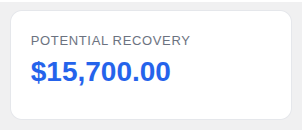
Calculates the total market value of your current waitlists. Use this to justify inventory expansion or restocking priority.
* **Target Pricing:** Customers choose exactly what they are willing to pay.
* **Archive Icons:** Heart icons on shop pages for quick wishlisting.
## Proactive Dashboard & Analytics
Transform your admin area into a data-driven command center. NotifyBay doesn't just send emails—it tells you how to grow your business.
Calculates the total market value of your current waitlists. Use this to justify inventory expansion or restocking priority.
 A 6-month historical view of customer requests. Identify seasonal patterns and growing product popularity at a glance.
 ## Exceptional Customer Experience
Building trust is just as important as building a list. NotifyBay provides your customers with the transparency they expect from a premium store.
Customers can view, manage, or cancel their notification requests directly from their native WooCommerce dashboard.
## Exceptional Customer Experience
Building trust is just as important as building a list. NotifyBay provides your customers with the transparency they expect from a premium store.
Customers can view, manage, or cancel their notification requests directly from their native WooCommerce dashboard.
 Automatically send follow-up emails when restocked items are running low again, driving immediate "last chance" conversions.
 ## Built for Growth & Compliance
Whether you are a small boutique or a high-volume enterprise, NotifyBay scales with you.
Includes Double Opt-In support and one-click unsubscription to ensure your email marketing stays compliant and your reputation stays clean.
## Built for Growth & Compliance
Whether you are a small boutique or a high-volume enterprise, NotifyBay scales with you.
Includes Double Opt-In support and one-click unsubscription to ensure your email marketing stays compliant and your reputation stays clean.
 Place your forms anywhere using native Gutenberg Blocks or flexible Shortcodes. Complete control over your site's layout.
