---
title: CartBay Documentation
description: Learn how to configure, operate, extend, and automate CartBay abandoned cart recovery for WooCommerce.
template: splash
prev: false
next: false
head:
# OpenGraph metadata
# FEED_LINKS.canonical — cannot use JS expressions in YAML frontmatter
- tag: meta
attrs:
property: og:url
content: https://docs.wpanchorbay.com/cartbay/
- tag: meta
attrs:
property: og:type
content: website
- tag: meta
attrs:
property: og:title
content: CartBay Documentation
- tag: meta
attrs:
property: og:description
content: End-user, developer, and AI-agent documentation for CartBay abandoned cart recovery for WooCommerce.
# FEED_LINKS.ogImage — cannot use JS expressions in YAML frontmatter
- tag: meta
attrs:
property: og:image
content: https://docs.wpanchorbay.com/cartbay/assets/WPAnchorBay-Documentation-OG.png
- tag: meta
attrs:
property: og:image:alt
content: CartBay Documentation – WPAnchorBay
- tag: meta
attrs:
property: og:image:width
content: "1200"
- tag: meta
attrs:
property: og:image:height
content: "630"
# Twitter / X Card metadata
- tag: meta
attrs:
name: twitter:card
content: summary_large_image
- tag: meta
attrs:
name: twitter:title
content: CartBay Documentation
- tag: meta
attrs:
name: twitter:description
content: Learn how to recover abandoned WooCommerce carts with capture, recovery emails, coupons, analytics, and safe automation.
# FEED_LINKS.ogImage — cannot use JS expressions in YAML frontmatter
- tag: meta
attrs:
name: twitter:image
content: https://docs.wpanchorbay.com/cartbay/assets/WPAnchorBay-Documentation-OG.png
- tag: meta
attrs:
name: twitter:image:alt
content: CartBay Documentation – WPAnchorBay
hero:
tagline: Recover abandoned WooCommerce checkout revenue with consented capture, a three-email sequence, restore links, coupons, analytics, and safe AI-agent controls.
image:
alt: CartBay by WPAnchorBay
file: ~/assets/wpanchorbay-icon.png
actions:
- text: Getting Started
# PAGE_LINKS.introduction — cannot use JS expressions in YAML frontmatter
link: /cartbay/getting-started/introduction/
icon: right-arrow
variant: primary
- text: Product Page
# EXTERNAL_LINKS.githubRepo — cannot use JS expressions in YAML frontmatter
link: https://wpanchorbay.com/plugins/cartbay/
icon: external
variant: minimal
---
import { CardGrid } from '@astrojs/starlight/components';
import Card from '../../components/starlight/Card.astro';
import WPAnchorBayFooter from '../../components/WPAnchorBayFooter.astro';
## What It Does
CartBay helps WooCommerce stores recover abandoned checkout revenue. It captures opted-in checkout visitors, tracks abandoned carts, sends a focused three-email recovery sequence, restores carts through secure links, offers optional recovery coupons, and reports recovered revenue inside the WordPress admin.
## How CartBay Works
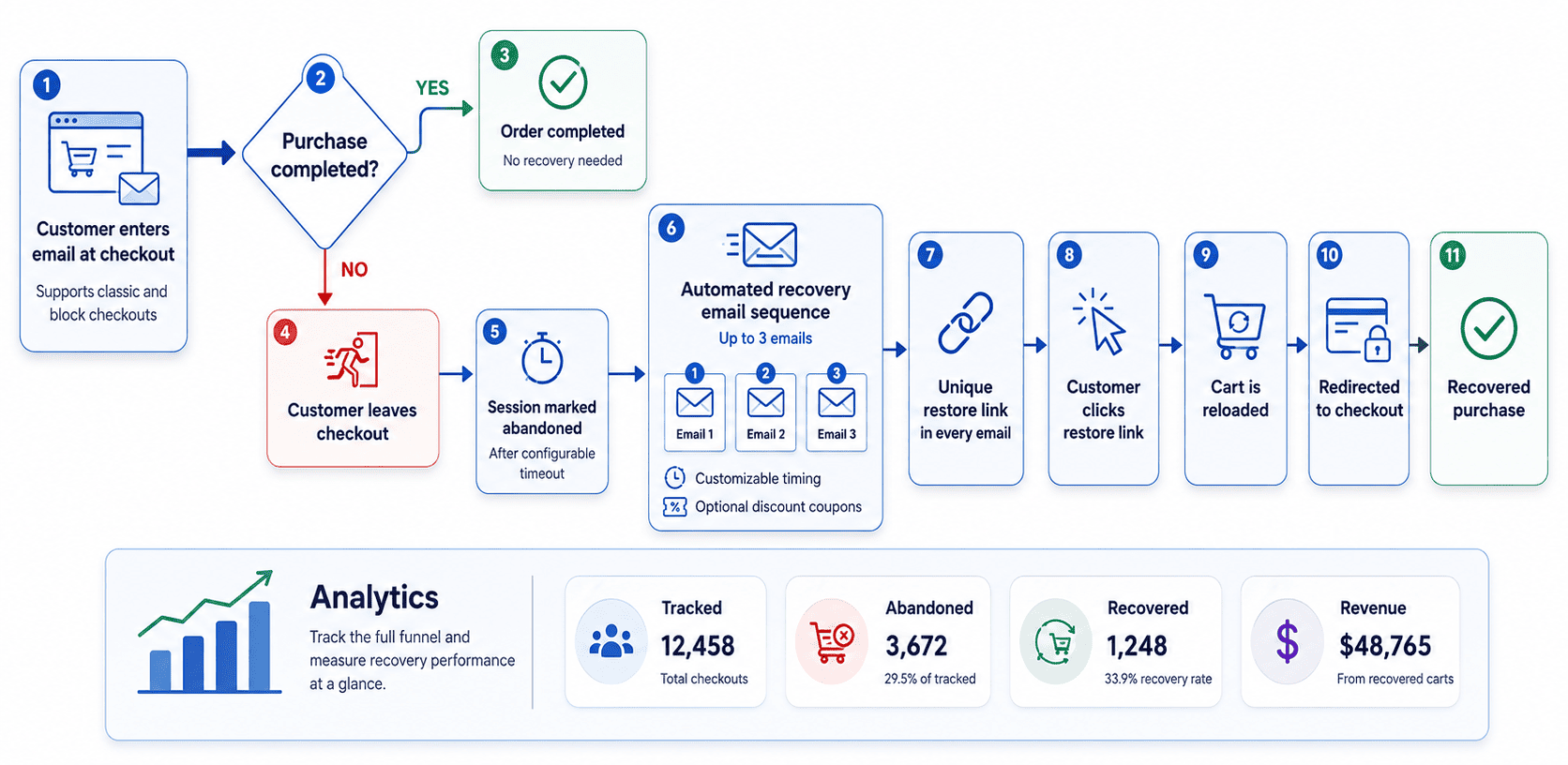 CartBay captures a customer's email from the checkout page when they enter it (classic and block checkouts are both supported). If the customer leaves without completing the purchase, CartBay marks the session as **abandoned** after a configurable timeout. A sequence of up to three recovery emails is then sent automatically, each with customizable timing and optional discount coupons. Every email includes a unique restore link that, when clicked, reloads the customer's cart and redirects them to checkout. Analytics track the full funnel — tracked, abandoned, recovered, and revenue — so you can measure recovery performance at a glance.
## Core Capabilities
- Consent-based checkout capture for classic checkout and WooCommerce Block Checkout.
- WooCommerce-native abandoned cart sessions stored through order objects.
- Action Scheduler-powered abandonment detection and email scheduling.
- Three recovery email steps with editable WooCommerce email templates.
- Secure restore and unsubscribe links using hashed tokens.
- Optional CartBay-generated recovery coupons with validation safeguards.
- Overview analytics for tracked carts, abandoned carts, recoveries, revenue, restore clicks, and failed restores.
- Notification tracking for queued, attempted, sent, failed, retry-queued, delivered, and canceled recovery emails.
- Optional protected AI-agent REST and WordPress Abilities access.
## Main Workflows
1. Install CartBay and activate the license.
2. Configure checkout capture, consent text, and abandonment timeout.
3. Set the three-email recovery sequence timing.
4. Customize recovery email templates in WooCommerce email settings.
5. Configure recovery coupons in Offers if your sequence uses incentives.
6. Verify email delivery with Test Mode and the test flow.
7. Monitor CartBay Overview and Notifications after launch.
## Start From
Learn what CartBay does, confirm requirements, install the plugin, activate your license, and launch your first recovery sequence.
Configure CartBay admin sections for capture, recovery sequence, notifications, templates, offers, settings, and troubleshooting.
Review CartBay architecture, storage, REST routes, hooks, background jobs, templates, emails, build, and QA references.
Use protected agent access, safe automation workflows, and operational guardrails for CartBay AI-agent integrations.
## Quick Links
- [Requirements](/cartbay/getting-started/requirements/)
- [Installation](/cartbay/getting-started/installation/)
- [License Activation](/cartbay/getting-started/license-activation/)
- **[Quick Start](/cartbay/getting-started/quick-start/)**
- [CartBay Overview](/cartbay/user-guide/overview/)
- [Capture](/cartbay/user-guide/capture/)
- [Recovery Sequence](/cartbay/user-guide/recovery-sequence/)
- [Templates](/cartbay/user-guide/templates/)
- [Offers](/cartbay/user-guide/offers/)
- [Notifications](/cartbay/user-guide/notifications/)
- [Settings](/cartbay/user-guide/settings/)
- [FAQ](/cartbay/others/faq/)
## Who This Is For
- Store owners who want to recover more WooCommerce checkout revenue.
- Store administrators who need to configure capture, emails, coupons, and reporting.
- Support teams who need to diagnose email delivery, restore links, coupons, or recovery attribution.
- Developers who need architecture, storage, REST API, hooks, templates, and QA details.
- AI agents and automation systems that need safe, least-privilege CartBay workflows.
## How to Navigate This Documentation
Start with Getting Started if you are installing CartBay for the first time. Use the User Guide when configuring a specific CartBay admin section. Use Developers for architecture, integration, and extension details. Use AI Agents when enabling automation or MCP-based workflows. Use Others for FAQ, discovery endpoints, and documentation metadata.
CartBay captures a customer's email from the checkout page when they enter it (classic and block checkouts are both supported). If the customer leaves without completing the purchase, CartBay marks the session as **abandoned** after a configurable timeout. A sequence of up to three recovery emails is then sent automatically, each with customizable timing and optional discount coupons. Every email includes a unique restore link that, when clicked, reloads the customer's cart and redirects them to checkout. Analytics track the full funnel — tracked, abandoned, recovered, and revenue — so you can measure recovery performance at a glance.
## Core Capabilities
- Consent-based checkout capture for classic checkout and WooCommerce Block Checkout.
- WooCommerce-native abandoned cart sessions stored through order objects.
- Action Scheduler-powered abandonment detection and email scheduling.
- Three recovery email steps with editable WooCommerce email templates.
- Secure restore and unsubscribe links using hashed tokens.
- Optional CartBay-generated recovery coupons with validation safeguards.
- Overview analytics for tracked carts, abandoned carts, recoveries, revenue, restore clicks, and failed restores.
- Notification tracking for queued, attempted, sent, failed, retry-queued, delivered, and canceled recovery emails.
- Optional protected AI-agent REST and WordPress Abilities access.
## Main Workflows
1. Install CartBay and activate the license.
2. Configure checkout capture, consent text, and abandonment timeout.
3. Set the three-email recovery sequence timing.
4. Customize recovery email templates in WooCommerce email settings.
5. Configure recovery coupons in Offers if your sequence uses incentives.
6. Verify email delivery with Test Mode and the test flow.
7. Monitor CartBay Overview and Notifications after launch.
## Start From
Learn what CartBay does, confirm requirements, install the plugin, activate your license, and launch your first recovery sequence.
Configure CartBay admin sections for capture, recovery sequence, notifications, templates, offers, settings, and troubleshooting.
Review CartBay architecture, storage, REST routes, hooks, background jobs, templates, emails, build, and QA references.
Use protected agent access, safe automation workflows, and operational guardrails for CartBay AI-agent integrations.
## Quick Links
- [Requirements](/cartbay/getting-started/requirements/)
- [Installation](/cartbay/getting-started/installation/)
- [License Activation](/cartbay/getting-started/license-activation/)
- **[Quick Start](/cartbay/getting-started/quick-start/)**
- [CartBay Overview](/cartbay/user-guide/overview/)
- [Capture](/cartbay/user-guide/capture/)
- [Recovery Sequence](/cartbay/user-guide/recovery-sequence/)
- [Templates](/cartbay/user-guide/templates/)
- [Offers](/cartbay/user-guide/offers/)
- [Notifications](/cartbay/user-guide/notifications/)
- [Settings](/cartbay/user-guide/settings/)
- [FAQ](/cartbay/others/faq/)
## Who This Is For
- Store owners who want to recover more WooCommerce checkout revenue.
- Store administrators who need to configure capture, emails, coupons, and reporting.
- Support teams who need to diagnose email delivery, restore links, coupons, or recovery attribution.
- Developers who need architecture, storage, REST API, hooks, templates, and QA details.
- AI agents and automation systems that need safe, least-privilege CartBay workflows.
## How to Navigate This Documentation
Start with Getting Started if you are installing CartBay for the first time. Use the User Guide when configuring a specific CartBay admin section. Use Developers for architecture, integration, and extension details. Use AI Agents when enabling automation or MCP-based workflows. Use Others for FAQ, discovery endpoints, and documentation metadata.
Getting Started